Best DC Power Jack Replacements for Laptops: Quick, Reliable Cable Solutions
Laptops rely on a solid, compatible DC power jack to recharge reliably. When a DC-in port begins to fail, a replacement cable can restore charging without a full motherboard repair. This article highlights five dependable options that fit a variety of brands and models, with emphasis on HP, Dell, and versatile universal adapters. Each choice lists its compatibility, key features, and practical considerations to help you select a suitable replacement quickly and confidently.
| Product | Brand | Core Compatibility | Note |
|---|---|---|---|
| GinTai Laptop DC In Power Jack Cable Charger (HP models) | GinTai | HP 13-C, 14-X, 15-AB, 17-X, more | HP series focus |
| Replacement DC Power Jack for Dell Inspiron & Vostro | KBRPARTS | Dell Inspiron 15 3501/3511/3520/3530, Vostro 3500 | Dell-centric compatibility |
| GinTai DC In Cable for Dell Inspiron & Vostro | GinTai | Dell Inspiron 3511/3515/3520/3530, Vostro 14/15 | Wide Dell coverage |
| Quacc Universal DC Connector Jack (5.5 x 2.1mm) | Quacc | Universal 5.5 x 2.1mm systems | Travel-friendly, versatile |
| PHONSUN Replacement DC Power Jack (Dell Latitude/Inspiron) | PHONSUN | Dell Latitude 3520/3530, 3420/3430 family | Dell Latitude focus |
GinTai HP Dell DC In Power Jack Cable for HP
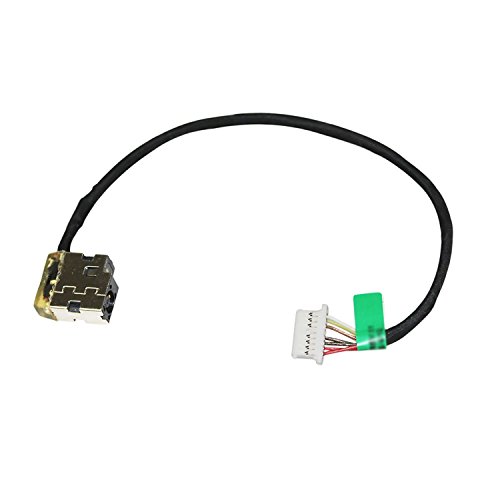
The GinTai DC in power jack cable is designed for a broad range of HP notebooks, including 13-C, 14-X, 15-AB, 15-CN, and related models. It offers a direct replacement path for charging ports that have worn or damaged jacks. Compatibility extends to several HP 15 series, 17X lines, and a Chromebook variant, making it a practical choice for mixed-device environments. The cable provides a straightforward plug-and-play solution with a compact form factor suitable for travel and on-site repairs. Always verify model compatibility before purchasing to ensure a secure fit and proper voltage alignment.
Replacement DC Power Jack for Dell Inspiron & Vostro

This Dell-focused replacement is labeled for Inspiron 15 3501/3502/3505/3593/5593/5594 and Inspiron 17 3793, as well as Vostro 3500/3501. It supports multiple Dell power configurations and shares P/N references such as 04VP7C and DC301015Q00. The product is designed to restore charging functionality where OEM jacks have failed, providing a practical, model-specific repair path for Dell users seeking to avoid motherboard-level diagnostics. Check exact model numbers to ensure compatibility before installation.
GinTai Dell Inspiron & Vostro DC In Cable
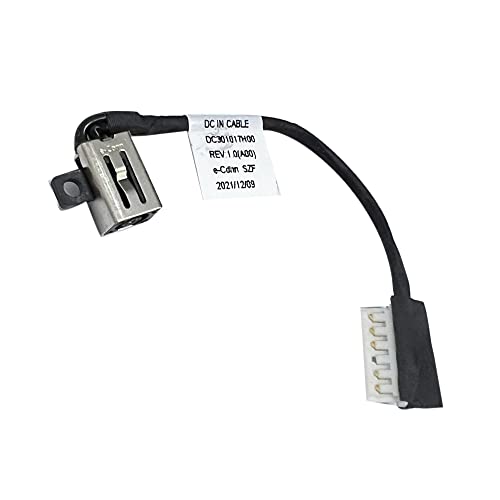
This GinTai model targets Dell Inspiron 3511/3515/3520/3530/3535, plus Vostro 14/15 variants and select GDM50/DC301017H00 parts. It presents a practical replacement option for Dell users whose charging port has degraded. The listing emphasizes a direct cable replacement rather than a full motherboard repair, helping reduce downtime. Verify your exact Dell model and DC jack specifications before purchasing to ensure compatibility with the connector’s pin configuration and cable length.
Quacc Universal DC Connector Jack (5.5 x 2.1mm) – 10 Pack

This kit provides ten universal DC jack adapters sized 5.5 x 2.1 mm, designed for a broad range of laptops from Lenovo, Dell, HP, Asus, Acer, Toshiba, and Sony. It’s ideal for techs and power users who service multiple brands. The pack emphasizes ease of use, compact build quality, and durability for repeat plugging. While versatile, confirm the exact connector size and polarity for your device, as mismatches can prevent proper charging or damage the laptop.
GinTai HP 15-AB & 17M-CE Series DC Power Jack Cable

This GinTai listing covers HP 15-AB, 15-CN, 15-CP, 15-DY, 17M-CE, 15S-DU, 15-bs, 15-bw, 15T-BR, and 15Z-BW along with 250/255 and 17X/17Y models. It mirrors the broader HP compatibility of the first GinTai option but focuses on a slightly different subset of HP configurations. It remains a practical DC-in cable replacement, enabling quick fixes without motherboard intervention. As with other HP-focused products, ensure exact model match before ordering.
Buying Guide: Key Purchase Considerations
- Model compatibility: Always verify the exact laptop model, serial, and part numbers (P/N) listed by the seller to avoid mismatches. A wrong jack can prevent charging or cause voltage irregularities.
- Jack size and polarity: Confirm the barrel plug dimensions (common sizes include 5.5 x 2.1mm) and polarity (center-positive or center-negative) for your device. Using the wrong configuration can damage the laptop.
- Cable length and flexibility: Short cables are neater, but longer cables give more working room during repairs. Consider the repair environment and whether a flexible or rigid connector is preferred.
- Build quality and durability: Look for reinforced housings, corrosion-resistant contacts, and strain relief to extend life in laptops that see frequent plugging/unplugging.
- Brand and warranty: Reputable brands (GinTai, PHONSUN, KBRPARTS, Quacc) typically offer better component quality and return policies. Check whether the seller provides a warranty or return window.
- Installation guidance: Replacement cables may require basic tools and careful handling. Review installation notes or video guides from the seller or trusted repair resources.
- Travel readiness: For technicians who service multiple devices, a universal set (like the Quacc 10-pack) can reduce stock variety and speed up repairs, though it may require careful size verification.
- Safety considerations: Use proper ESD precautions and ensure the laptop is powered off and unplugged before replacement. Confirm the device has no residual charge in the system to avoid shorts.