Best Conference Room Table Power Boxes for Clean, Cornered Cable Management
When equipping a modern conference room, a dedicated power box helps keep cables organized and devices charged without clutter. Below are five top-rated power hubs designed for desks, tables, and conference centers. Each product combines multiple outlets, USB charging, and data ports in a sleek, durable housing to accommodate meetings, presentations, and collaborative sessions.
| Product | Brand | Key Features |
|---|---|---|
| Table Pop up Power Date Center Connection Box with Outlet Network HDMI for Conference Desk | Jiangce | US Power, 2 RJ45, HDMI, USB data, VGA, Audio; Aluminium panel; 10.5″ x 4.6″ panel |
| Kungfuking Conference Table Power Hub | Kungfuking | UL Listed, 125V/12A/1500W; HDMI, Network; 3 USB, 2 AC outlets; 6 ft cord |
| Conference Table Power Outlet PD20W Type-C Fast Charging Pop Up Hub | JACEPFY | PD 20W USB-C; 3 outlets; USB-A; 45-degree pop-up |
| Jiangce Conference Table Power Hub | Jiangce | 2 AC outlets; HDMI 4K; PD 20W; USB-C; USB-A; LAN |
| Pop Up Power Strip with PD 30W USB Ports | Kungfuking | 2 AC outlets; USB A/C ports; 45-degree pop-up; compact footprint |
Explore five reliable options that blend safety, accessibility, and performance for busy conference spaces. Each choice supports modern meeting tech, from HDMI displays to USB-C devices, while preserving clean tabletops and safe cable routing.
Jiangce Table Pop Up Power Center

The Jiangce power hub offers a compact aluminium panel and a multi-port configuration designed for conference desks. It includes US power, 2 RJ45 Ethernet ports, an HDMI port, USB data, a VGA connection, and a 3.5 mm audio output. Panel size is 10.5″ x 4.6″ with a suggested cutout of 8.9″ x 4.33″. This combination supports presentations with wired network access and display output while keeping wires out of sight when not in use.
Kungfuking Conference Table Power Hub

This UL-listed hub emphasizes safety with a 125V/12A/1500W rating and a six-foot power cord. It aggregates HDMI and Network ports, USB ports, and two AC outlets in a 7-in-1 arrangement. The design helps declutter desktops by tucking all connections into a recessed box, enabling clean presentation spaces. The PD 20W USB-C fast charging and multiple USB-A ports support quick device charging during meetings.
JACEPFY PD20W Pop Up Hub

The JACEPFY table hub features 3 outlets plus USB-C and USB-A charging options, with PD 20W USB-C fast charging and 45-degree pop-up operation. It supports multiple devices and charging needs, ensuring phones, tablets, and laptops can be powered without obstructing workspace. The dual USB ports enable simultaneous charging and data transfer for certain devices, while the pop-up design keeps cables concealed when not in use.
Jiangce 20W Type-C PD Power Hub

This Jiangce model combines 2 AC outlets, a 20W PD fast-charging USB-C port, HDMI for 4K video, and USB 3.0. It is designed for quick setup in conference zones, delivering intelligent current distribution and stable data/video transmission. The power hub aims to simplify cable management while supporting high-demand devices used during meetings and presentations.
Kungfuking Pop Up Power Strip With PD
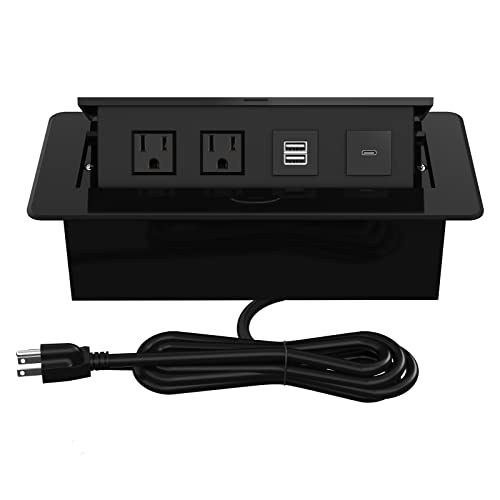
This 30W PD-enabled hub provides two AC outlets and USB ports in a compact pop-up design. Its 45-degree lift makes it easy to access two US plugs and multiple USB devices, while the built-in lid helps keep prying dust and debris away when the unit is retracted. It is suitable for smaller conference areas where space and tidy surfaces are priorities.
Kungfuking 15W Wireless Conference Hub

This 8-in-1 hub blends 15W wireless charging with four AC outlets, PD 20W USB-C, and dual QC 18W USB-A ports. It provides a comprehensive charging and connectivity solution for meetings that involve wireless devices and laptops. The capacity to power multiple devices while maintaining a clean surface makes it suitable for larger meeting tables and collaborative spaces.
TIANDIGP Embedded Mesa Power Box

This embedded table power box features a brushed aluminium panel, four US outlets, USB charging, and dual A+C interfaces. It emphasizes corrosion resistance and a smooth edge finish. The fully integrated design fits flush with table surfaces, offering a premium aesthetic and straightforward installation for professional environments, including meeting rooms and study spaces.
ZESHAN Cable Cubby Conference Box

With a 45-degree lid panel and a fully enclosed bottom, the ZESHAN box offers 2 AC outlets, 2 RJ45 ports, HDMI, USB, and a Type-C port. Its 10.47″ x 5.12″ panel and 10.16″ x 4.73″ hole cut size balance footprint and capacity, while a CNC-machined 6063 aluminum lid and reinforced bottom promote durability and safety in busy meeting environments.
Buying Guide
Key purchase considerations
- Port variety: Ensure the hub provides a mix of power outlets, USB ports, HDMI, USB-C, and network capabilities to support displays, conference calls, and device charging.
- Power rating and safety: Look for UL or equivalent certification, adequate wattage, and tempered safety features such as a grounded chassis and surge protection.
- Form factor and installation: Consider panel size, cutout dimensions, and whether a 45-degree pop-up or recessed design best fits your table and room layout.
- Charge speed and compatibility: USB-C PD and high-wattage USB-A ports accelerate charging for laptops and phones; verify compatibility with your devices.
- Data and video capabilities: HDMI 4K support and Ethernet (RJ45) ports enable reliable presentations and conference room networking.
Design and ergonomics
- Material quality: Aluminum panels and CNC machining provide durability and a premium look suitable for executive spaces.
- Cable management: Aesthetics matter; choose boxes with lids or covers to hide cables when not in use.
- Ease of use: A user-friendly pop-up mechanism and clear labeling reduce setup time during meetings.
Use-case considerations
- Room size and device mix: Larger rooms with multiple displays and conferencing devices may require hubs with more ports and higher power ratings.
- Maintenance: Consider ease of cleaning, resistance to dust, and whether the unit has features that minimize wear over time.
- Cost of ownership: While features vary, balance upfront cost with long-term value from reduced cable clutter and improved meeting efficiency.