Best Busy Lights for Office to Minimize Interruptions and Boost Focus
In open-office environments, staying focused is essential. Busy lights provide at-a-glance status indicators that signal when you’re available, in a meeting, or need uninterrupted time. This guide highlights five top busy lights that suit American offices, from compact desk indicators to multi-color signaling systems. Each option integrates with daily workflows to reduce interruptions and improve productivity.
Summary of chosen products
- iTalkes Clip Busy Light Standard for The Office
- Kuando Busylight UC Omega (15410)
- SOMKISL Busy Light with Monitor Stand
- BRAITEN Busy Light for Office (Do Not Disturb)
- On Air Warning! Busy Light for The Office
iTalkes Clip Busy Light For The Office

The iTalkes busy light uses a tall tube design to clearly display availability to colleagues. It communicates when you are on a call, working on a deadline, or free to chat, reducing unnecessary interruptions. The device attaches easily to walls, doors, or desktops with a metal clip capable of grabbing borders under 30mm. A simple, quick setup supports fast deployment in busy offices. This indicator helps maintain focus during deep work while signaling to teammates when you are open for collaboration.
- Visual status signaling to nearby coworkers
- Wall, door, or desk mounting compatibility
- Clip-based installation for flexible placement
Kuando Busylight UC Omega (15410)

The Kuando UC Omega signals presence and plays a ring alert for calls or chats, UC platform dependent. It displays availability using color cues (green for available, red for busy) with additional colors supported by specific UC platforms. A free Busylight Software suite is available for popular platforms, enabling smoother integration with Microsoft Teams, Skype for Business, Cisco Jabber, Webex, Zoom, and more. This solution emphasizes unobtrusive status signaling plus notification management for calls and chats.
- Presence indicator with optional ring alert
- Multi-color signals per UC platform
- Free software for major unified communications tools
SOMKISL Busy Light With Monitor Stand
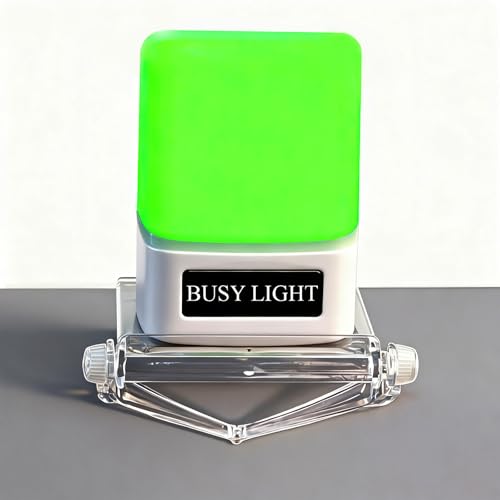
This busy light features three color modes—Available, Busy, and Away—paired with a monitor stand for convenient visibility. The red mode serves as a Do Not Disturb cue during meetings or intensive work periods, signaling teammates to reduce interruptions. Its straightforward manual controls allow quick status changes, making it a practical addition for offices that prefer tactile adjustments and immediate feedback at a glance. The device is designed to blend into standard workspaces while delivering clear signals.
- Three color modes for quick status signaling
- Desk or monitor mounting compatibility
- Intuitive manual controls for rapid changes
BRAITEN Busy Light For Office

The BRAITEN Busy Light signals status with red and green indicators to reflect availability during meetings or focused work. It is designed for simple installation with adaptable mounting options for desks, cubicles, or office doors. The device serves as a clear Do Not Disturb or Available cue, helping coworkers understand current work demands. This model emphasizes ease of use and quick visibility in open-office layouts, supporting smoother workflow management without complex setup.
- Red/green status indicators
- Versatile mounting for desks or doors
- Clear visual cues to minimize interruptions
On Air Warning Busy Light

The On Air Warning Busy Light offers more than a basic mute status. It combines a three-light display with a central status indicator to show in-meeting activity, microphone, and camera states. It works with Mac and PC and pairs with the MuteBar App for customizable mute controls and in-meeting options. This solution is well-suited for hybrid setups, video calls, and collaboration-heavy environments, providing a comprehensive visual cue during meetings and streams.
- Three-status indicators for mic, camera, and in-meeting
- App-integrated customization for in-meeting controls
- Broad compatibility with major conferencing platforms
Buying Guide: Key Considerations For Choosing A Busy Light
- Signal clarity and color coding: Look for multiple colors or distinct indicators that map to common statuses (available, busy, do not disturb, away). Ensure the colors are bright enough for quick recognition in varied lighting.
- Mounting flexibility: Choose models that can attach to desks, walls, doors, or monitor edges. This ensures optimal visibility in your workspace and accommodates evolving layouts.
- Software integration: If you rely on UC platforms (Teams, Zoom, Webex), consider devices that offer software support or plug-ins. This can enable richer features, such as auto-status syncing with calendar events or presence data.
- Ease of use: Physical controls or straightforward app configurations reduce setup time and minimize friction when changing statuses during a busy day.
- Compatibility: Ensure the device works with your operating system (Windows or Mac) and your conferencing tools. Some models require software to unlock full functionality.
- Power and connectivity: Evaluate whether the device uses USB power, wall adapters, or battery power. USB-powered units are common in office environments and simplify cable management.
- Durability and design: A compact, unobtrusive design integrates well into most office décors. Consider whether a larger display or a slim indicator better fits your desk or wall space.
- Privacy and focus policies: Busy lights can complement other focus tools, such as door hangers or meeting-room signs. Consider a model that supports quick transitions between statuses to respect colleagues’ time.
- Software-free options: If you prefer hardware-only cues, prioritize devices with tactile controls and clear LEDs that do not require additional software installation.
When selecting a busy light, align features with your daily workflow. For collaborative hubs, a multi-color or signal-rich option can improve awareness without interrupting colleagues. For focused roles, a clear Do Not Disturb cue and easy status toggling are essential. In hybrid environments, software-enabled indicators that sync with calendars offer the most seamless experience. Regardless of choice, a well-placed busy light can meaningfully reduce interruptions and preserve productive time in busy American offices.