Best Backup Generators for Computer Power Security and Reliability
When safeguarding a computer system during outages, selecting a backup generator means prioritizing stable power, quiet operation, and dependable startup. The following hand-picked models balance clean power delivery, transfer-switch readiness, and versatile fuel options. Each product is assessed for home or small-office use, ensuring you can keep critical equipment online when the lights go out.
| Product | Brand | Power Type | Key Benefit |
|---|---|---|---|
| Anker SOLIX C1000 Gen 2 | Anker | Portable Power Station | High-speed recharge and multi-port output for electronics |
| Westinghouse 12500 Peak Watt Dual Fuel | Westinghouse | Gas/Propane | Remote start, transfer-switch readiness, CO sensor |
| Generac GP8000E | Generac | Gas | PowerRush technology and long runtime |
| DuroMax XP13000EH | DuroMax | Gas/Propane | Dual-fuel flexibility with powerful output |
| PowerSmart 4400-Watt | PowerSmart | Gas | Inverter-style quiet operation for home use |
Anker SOLIX C1000 Gen 2 Portable Power Station
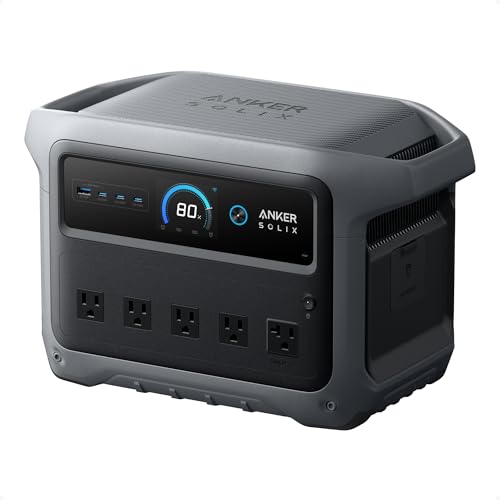
The Anker SOLIX C1000 Gen 2 combines 2,000W continuous output with a peak of 3,000W, powered by a 1,024Wh LiFePO4 battery. It supports rapid recharging and can handle multiple devices through up to ten ports. Its compact form factor makes it a practical pick for protecting a computer setup during outages, especially when used with a modest power draw from peripherals, networking devices, and essential equipment. The battery chemistry supports safety and longevity, with the option to expand capacity via solar input in compatible configurations.
Westinghouse 12500 Peak Watt Dual Fuel

This dual-fuel generator offers 9,500 running watts on gasoline and 8,500 running watts on propane, with a peak around 12,500 watts. It includes a remote start, multiple outlets, and a transfer switch-ready design to simplify integration with a home electrical system. A CO sensor provides an added safety layer, and the unit can operate for up to about 12 hours on a full tank. The dual-fuel flexibility helps keep a computer workspace powered even when fuel supply is variable, though you’ll want to ensure proper ventilation and a stable installation for home backup use.
Generac 10,000/8,000-Watt Portable Gas Generator

Generac’s GP8000E line emphasizes PowerRush technology for enhanced starting capacity and an extended runtime with a large, durable fuel tank. Electric start simplifies operation, a key feature for any office or home where a quick power restoration matters for servers and computers. With a 50% load runtime around 11 hours, the GP8000E is designed for longer outages, providing an option for critical electrical loads while keeping noise within reasonable bounds for residential use.
DuroMax XP13000EH Dual Fuel Generator

The XP13000EH provides 13,000 watts of power and dual-fuel flexibility (gasoline or propane). Its design centers on robust performance for home backup and emergency power, with a focus on versatility and long-term reliability. The engine is built to withstand frequent use, and the propane option can be advantageous for longer outages or where longevity and fuel shelf life matter. This unit supports transfer-switch readiness, making it a practical choice for users seeking a strong, adaptable backup system.
PowerSmart 4400-Watt Portable Inverter Generator

PowerSmart’s 4400-watt inverter generator focuses on quiet operation and practical home backup use. With a 1.6-gallon fuel tank and an estimated runtime of up to 11 hours at light loads, it offers a compact solution for protecting a computer setup in small apartments or homes where noise considerations are important. The inverter design helps deliver cleaner power for electronics, which is beneficial for sensitive equipment and networking gear during outages.
Buying Guide
Choosing the right backup generator for a computer-centric setup involves balancing power needs, reliability, and safety. Consider the following factors to compare models effectively:
- Power needs and fuel type: Assess total wattage for your computer equipment plus critical peripherals. For office setups, 1000–3000W of inverter or standby power is often sufficient, while larger systems may require 6000–10000W or more. Dual-fuel options offer flexibility during fuel shortages.
- Startup surge vs. continuous load: Computers and networking gear have modest running loads but can experience spikes when devices boot up. Generators with adequate surge capacity prevent startup drops and voltage dips.
- Transfer switch compatibility: A transfer switch enables seamless power transfer from the grid to the generator. Look for units labeled transfer-switch ready or those that support easy integration with a home electrical panel.
- Fuel efficiency and runtime: Longer runtimes between refuels are advantageous for extended outages. Propane tends to have a longer shelf life than gasoline, but availability varies by region.
- Clean power delivery: For electronics, inverter generators or those with CO shutdown and stable sine-wave output reduce the risk of damage to computers and peripherals.
- Noise and footprint: Quieter models are better for living spaces, especially if the backup system will operate near an office or living room. Consider enclosure design and muffling characteristics.
- Safety features: CO sensors, automatic low-oil shutdown, and an automatic idle or load management system help protect both the generator and your devices.
- Outlets and connectivity: Ensure the generator provides suitable outlets for your setup, plus USB-C or USB-A ports if you rely on powered devices that use USB charging.
- Maintenance and warranty: A model with accessible service intervals and a solid warranty reduces total ownership cost and downtime during outages.
Additional Considerations
In installation planning, factor in ventilation, proximity to living spaces, and exhaust management. For office environments, a dedicated, properly installed transfer switch is essential to prevent backfeeding and to ensure a safe connection to the home electrical system. If you plan to run multiple devices, group critical components (router, modem, NAS, and a small workstation) and test startup sequences before an outage to minimize disruption.
Overall, the best backup generator for a computer-centered setup blends reliable electrical performance with practical features like transfer-switch readiness, CO safety, and quiet operation. The models above offer a range of capabilities—from compact power stations to robust dual-fuel generators—so you can select a solution that matches your space, budget, and resilience goals.