Best Alarm Systems Without Monitoring for Home Security
Answer: For buyers seeking reliable, contract-free home security, these systems offer local control, app alerts, and no ongoing monitoring fees. They’re best for do-it-yourself homeowners, renters, or property managers who want quick setup and flexible expansion without monthly contracts. The list below highlights five models that emphasize no ongoing monitoring fees while still delivering immediate notifications, remote access, and broad coverage across doors, windows, and motion zones.
| Product | Key Benefit | Best For |
|---|---|---|
| PGST 8-Piece Wireless Alarm System | No monthly fees or contract; 8-piece kit; remote alerts via Tuya app | Homeowners seeking deterrence plus DIY expansion |
| PGST 103-F Wireless Home Alarm System | Absolute no-subscription setup with mobile alerts | |
| Hapippofa Wireless Home Security System | Smart-home lovers wanting voice control | |
| XUK WiFi Wireless Alarm System | Users favor a modern control panel and voice assist | |
| GRSICO 9-Piece System | Budget-conscious buyers wanting easy installation |
PGST Wireless Alarm System for Home Security (8-Piece)

This system combines door/window sensors and motion detectors with a powerful siren for deterrence. It supports Tuya app alerts and Alexa compatibility. Best for mid-sized homes or apartments where immediate deterrence and remote alerts are valued. The kit emphasizes no monthly fees and DIY installation, making it suitable for renters and homeowners who want quick, contract-free security. A potential limitation is the siren’s loudness could be disruptive in small living spaces or shared walls.
Who it’s best for: Renters or homeowners who want a strong deterrent with remote control, no ongoing costs, and simple expansion as needs grow. The kit’s 8 pieces cover entry points and motion areas for balanced coverage.
PGST Home Security Systems (103-F, 4G/WiFi, No Subscription)

This kit provides WiFi plus GSM/4G connectivity and an app-based control experience. It supports Smart Life or Tuya apps for remote arming, disarming, and notifications, with no monthly fees. It’s a solid choice for homes needing reliable remote control across multiple devices without a monitoring contract. A limitation to watch for is potential data usage on mobile networks if you rely heavily on remote alerts from distant locations.
Who it’s best for: Homeowners who want robust app control, multi-network operation, and a firm no-subscription policy across a whole-home setup.
Hapippofa Wireless Home Security System

The Hapippofa system emphasizes real-time mobile monitoring, voice control, and Alexa compatibility within a DIY framework. It’s best for households that want hands-free operation and quick, spoken status checks. The kit’s reliance on a modern app for status and alerts keeps daily interactions simple. A caveat is that some users may require stable WiFi or cellular coverage for consistent notifications when away from home.
Who it’s best for: Households seeking hands-free control and easy integration with Alexa or Google Assistant, plus reliable app-based alerts without ongoing monitoring commitments.
PGST Wireless Alarm System (24 Pcs) With Instant App Alerts
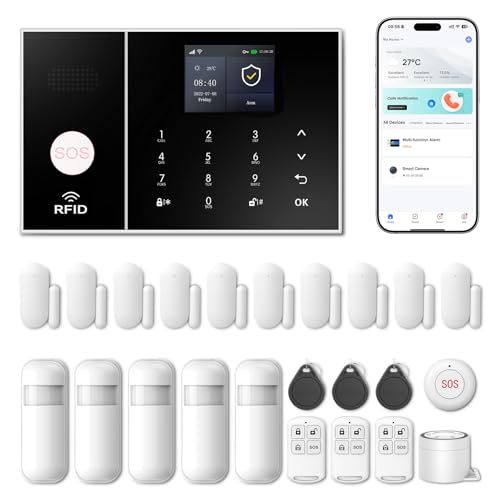
This expansive kit offers extensive coverage suitable for larger apartments or villas. It emphasizes no monthly fees and app-based push alerts, along with multi-zone support and a color display on the main unit. Best for users who want a high-density sensor layout without subscription costs. A limitation could be the larger kit’s setup complexity and the need for careful placement to avoid false alarms in busy households.
Who it’s best for: Property owners who need comprehensive coverage across many zones and prefer a single, expandable system with a straightforward app workflow and no recurring monitoring fees.
Buying Guide
What to consider when choosing an alarm system without monitoring:
- Coverage and expandability: Ensure the base kit includes essential doors, windows, and a motion sensor, plus options to add more sensors over time.
- Connectivity: Decide between WiFi-only, cellular backup (4G/2G), or dual connectivity to prevent outages when the internet goes down.
- App reliability: Look for systems with well-supported apps (Tuya, Smart Life) that push real-time alerts and allow remote arming/disarming.
- Deterrence vs. detection: A loud siren helps deter intruders; ensure the siren volume is practical for your living space and neighbors.
- Voice assistant compatibility: If you use Alexa or Google Assistant, verify compatibility for hands-free control and status checks.
- User interface: A color touchscreen or simple app can simplify daily use, especially for families or seniors.
- Privacy and data use: With no monitoring contract, understand how alerts are delivered (SMS, app, voice call) and the data requirements.
- Installation and maintenance: Check if the system is truly DIY and whether sensors require special mounting or tools for optimal placement.
Frequently Asked Questions
- Do these systems require ongoing monitoring? No. The products listed emphasize no monthly monitoring fees; alerts and control come via apps, SMS, or voice calls depending on the model.
- Will I still get real-time alerts if my internet goes down? Some models offer cellular backup (4G/2G). Check the product specs to confirm how alerts are delivered during outages.
- Can I expand the kit later? Yes. All selected options support sensor expansion, allowing you to add doors, windows, or motion detectors as needed.
- Is professional installation necessary? Not typically. These are designed for DIY setup, though some kits may offer optional assistance in certain regions.
- Are these compatible with voice assistants? Several models support Alexa or Google Assistant for control and status checks.
- Do these require a subscription for advanced features? No subscription is required for core alerting and control in the listed products; some features may vary by app and region.