Best AIO Coolers With LCD Screens for PC Builders
If you’re upgrading a high-performance PC, an all-in-one (AIO) liquid cooler with an LCD screen can blend advanced cooling with eye-catching visuals. This guide highlights select models featuring 2.1-inch or larger LCD displays, offering real-time data, customizable imagery, and enhanced aesthetics. Explore top options from Corsair, Thermalright, and Jungle Leopard to find a model that balances cooling efficiency with vivid on-board screens.
| Product | Brand | Display | Cooling Size | Notes |
|---|---|---|---|---|
| Corsair Nautilus 360 RS LCD White | Corsair | 2.1″ IPS LCD | 360mm | Low-noise, customizable LCD |
| Corsair Nautilus 360 RS LCD Black | Corsair | 2.1″ IPS LCD | 360mm | Low-noise, customizable LCD |
| Thermalright FW360 Black ARGB | Thermalright | IPS LCD 320×240 | 360mm | ARGB lighting, LCD control |
| Jungle Leopard PF360 CPU Water AIO | Jungle Leopard | 5.5″ LCD (480×960) | 360mm | Magnetic screen, customizable content |
| Corsair Titan 360 RX LCD | Corsair | 2.1″ IPS LCD | 360mm | iCUE LINK, vibrant display |
Corsair Nautilus 360 RS LCD White

Corsair’s Nautilus 360 RS LCD White combines a 360mm radiator with a 2.1-inch IPS LCD display. The system emphasizes low-noise performance, with a quiet pump and a compact convex cold plate that ensures strong contact with the CPU’s heat spreader. The LCD adds a customizable visual element to your build, showing real-time temps or a user-chosen image.
Corsair Nautilus 360 RS LCD Black

This Black variant offers the same 360mm radiator and 2.1-inch IPS LCD with an emphasis on a stealthy aesthetic. It maintains Corsair’s focus on low-noise operation and efficient coolant flow, with a convex cold plate designed for maximum contact with the CPU. The built-in LCD screen provides a customizable surface for system information or artwork while you game or work.
Thermalright FW360 Black ARGB

Thermalright’s FW360 Black ARGB pairs a 360mm radiator with an IPS LCD screen capable of displaying defined metrics and customizable visuals. The pump aims for quiet operation at typical loads, and ARGB lighting adds an ambient glow to the overall appearance. This model emphasizes a balance between robust cooling performance and a visually engaging display.
Jungle Leopard PF360 CPU Water AIO
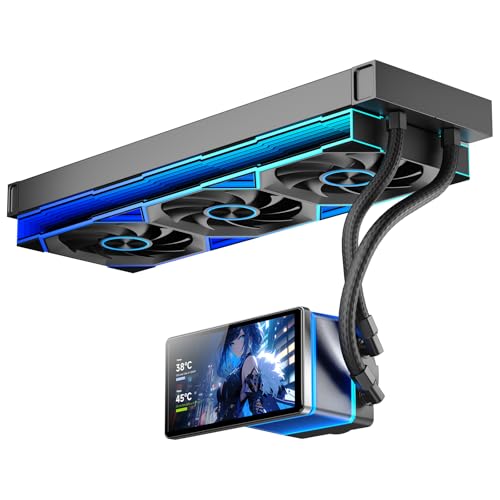
Jungle Leopard’s PF360 features a 5.5-inch LCD screen with high-resolution output (480×960) and a magnetic, rotatable design for flexible viewing angles. It supports customized backgrounds and data displays via dedicated software, and its radiators work with up to 320W TDP cooling. The three PWM fans deliver up to 2000 RPM for strong airflow with controlled noise.
Corsair Titan 360 RX LCD

The Corsair Titan 360 RX integrates an iCUE LINK ecosystem with a 2.1-inch IPS LCD that can display CPU temperature, custom GIFs, or logos. The system hub and streamlined connectors reduce cable clutter, while the 360mm radiator and three RX120 fans promote strong cooling performance with the convenience of centralized control via iCUE LINK.
Buying Guide: Key Purchase Considerations
- Display quality and size: LCD screens range from 2.1 inches to larger 5.5-inch panels. Consider resolution, brightness, and how easy it is to read at a glance during gaming or work sessions.
- Cooling performance: A 360mm radiator generally provides strong cooling for mid-to-high TDP CPUs. Check fan speed range, pump noise, and overall thermal headroom.
- Noise profiles: Look for models advertised as low-noise or whisper-quiet, especially if your build will operate in quiet environments. PWM-controlled fans help optimize noise vs. cooling.
- Display customization: Some LCDs support static images, animated GIFs, or real-time data. Consider how you want to personalize the display (temps, logos, art).
- System integration: iCUE LINK or other ecosystem connectors can simplify wiring and enable centralized monitoring. Ensure your motherboard and case have compatible headers or hubs.
- Installation complexity: Some models use daisy-chain fan connections to reduce cabling; others require multiple separate connections. Evaluate your build’s cable management tolerance.
- ARGB and lighting: If you care about matching the PC’s lighting, ARGB compatibility and synchronized lighting across fans can enhance the aesthetic.
- Maintenance and reliability: Pre-applied thermal paste and robust pump design can speed up installation and reliability over time.