Best 6U Wall Mount Network Racks for Compact IT Setups and Small Offices
Answering the demand for space-efficient, secure, and accessible network storage, these 6U wall mount racks are designed for small offices, home labs, and retail environments where floor space is premium. The top picks below are best for equipment like switches, patch panels, and compact servers, with emphasis on security, airflow, and easy cable management. This guide highlights who each product is best for and why. A quick summary table follows to help compare core specs at a glance.

| Product | Best For | Key Benefit |
|---|---|---|
| NavePoint 6U Server Rack Enclosure with Glass Door | Security-conscious small offices | Lockable tempered glass door and removable side panels |
| Tecmojo 6U Wall Mount Server Cabinet | Compact IT closets | Lockable door and side panels with flexible door orientation |
| StarTech.com 6U Wall Mount Rack | Space-constrained installs | Low-profile 14″ depth with ready-to-install hardware |
| NavePoint 6U Wall Mount Rack – Open Frame with Glass Door | Budget-conscious secure setups | Tempered glass front, removable side panels, 6U capacity |
| ECHOGEAR 6U Wall Mount Rack | All-in-one value packs | Includes shelves, fans, lockable door, quick install |
NavePoint 6U Server Rack Enclosure with Glass Door, Locks & Removable Sides
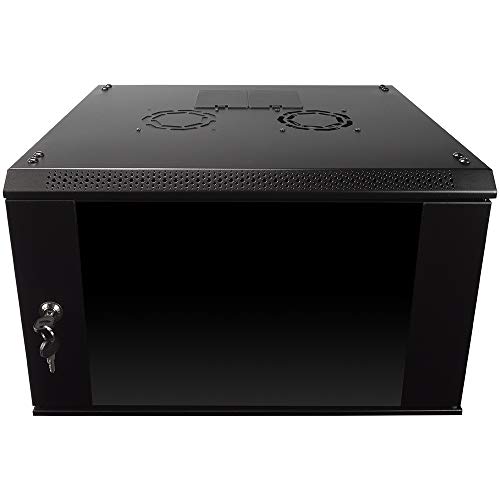
This 6U wall-mounted cabinet is built for security and adaptable configuration. The welded cold-rolled steel frame supports up to 110 lbs and fits standard 19″ equipment. The reinforced tempered glass front door includes a lock, and side panels are removable for flexible access. The cabinet measures 17.72″ L x 21.65″ W x 13.92″ H, making it suitable for compact IT closets and small offices where security and cable management matter.
Best for: small offices or classrooms needing a secure enclosure for switches, routers, and compact servers. Why selected: robust steel construction with lockable glass door and removable sides offers secure access and adaptable setup. Caution: max weight and depth are limited, so verify equipment fit before purchase.
Tecmojo 6U Wall Mount Server Cabinet IT Network Rack
Designed to save floor space, this 6U cabinet measures 13.78″ H x 21.65″ W x 17.72″ D with a 14.2″ max mounting depth. It includes a lockable glass door and lockable side panels, with a front door that can be installed on either side to suit door swing preferences. Fully adjustable mounting rails and numbered U positions facilitate precise equipment placement and cable routing.
Best for: users needing a lockable, space-efficient enclosure with flexible door orientation. Why selected: solid security features and configurable rails support varied 19″ IT gear. Caution: 450mm depth is shallow for deeper equipment; check your depth requirements before buying.
Tecmojo 6U Wall Mount Rack, 14″ Depth

This 6U rack offers a compact 14″ maximum mounting depth, making it a suitable choice for shallow equipment and fast setups. It supports up to 110 lbs and presents a simple “open and use” design, with a reversible front door to fit different spaces. Cables can be fixed on the side panel for smoother management.
Best for: installations requiring a shallow, quick-to-deploy wall rack. Why selected: straightforward open-frame design with robust steel construction. Caution: absence of included shelves means additional components may be needed for some configurations.
StarTech.com 6U Wall Mount Network Rack – 14″ Deep
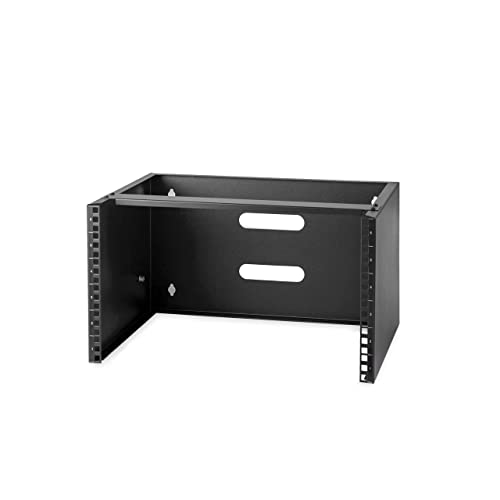
This low-profile rack is built from cold-rolled steel and holds up to 44 lb. It ships fully assembled and includes mounting hardware, making installation quick and hassle-free. The 14″ depth is ideal for shallow deployments such as small office closets or under-desk setups where space is limited.
Best for: tight installations needing a ready-to-install, durable mount. Why selected: includes hardware and is fully assembled, reducing setup time. Caution: lower weight capacity than some other options; confirm your equipment weight is within limits.
NavePoint 6U Wall Mount Rack – Open Frame

This 6U open frame rack from NavePoint emphasizes airflow with an open design, making it suitable for network gear that benefits from breathable layouts. The open frame supports up to 200 lbs and is adaptable for wall mounting, offering straightforward assembly and cable management.
Best for: users prioritizing airflow and easy access over a locked front door. Why selected: high weight capacity and open design simplify upgrades. Caution: lacks front door security; consider a door if security is a concern.
Buying Guide
What to consider when choosing a 6U wall mount rack
- Depth and footprint: Measure available wall space and confirm max mounting depth (common ranges include 14–16 inches). Choose a model that fits your equipment and cable management needs.
- Security: Decide if a lockable front door and side panels are required to protect equipment from tampering, particularly in shared or public spaces.
- Weight capacity: Confirm the total weight of your 19″ equipment (switches, patch panels, small servers) and select a rack with a comfortable margin above that load.
- Airflow and cooling: Look for racks with open frames, vented panels, or integrated cooling features to prevent overheating of critical devices.
- Installation and accessories: Consider whether the rack ships fully assembled or requires assembly, and whether it includes hardware, shelves, or cable management options.
- Door orientation: If door swing direction matters, choose a model with reversible doors to fit your space and workflow.
Open frame vs enclosed design: which to choose?
Open frame racks provide the easiest airflow and cable access, making them ideal for quick upgrades and systems that generate significant heat. Enclosed designs with glass or metal doors offer security and aesthetics, beneficial for shared offices or classrooms where unauthorized access should be limited. If security is a priority, prioritize enclosures with locking doors and removable side panels.
Who should consider these 6U wall mounts?
- Small offices and retail locations needing compact QTY0 of IT gear in a secure footprint.
- Home labs and hobbyists deploying switches, small servers, or patch panels without dedicating floor space.
- Educational settings requiring organized, accessible, and visually tidy equipment racks.
Care and maintenance tips
- Keep cables neatly labeled and anchored to side panels or rails to simplify future upgrades.
- Regularly inspect locks and door hinges for proper operation to maintain security.
- Periodically check vent openings for dust buildup and clean as needed to preserve airflow.
FAQ
- What is the typical depth for a 6U wall mount rack? Depths commonly range from 14 to 16 inches, with some models at 13–14 inches for ultra-compact spaces.
- Can these racks hold a small server or only networking gear? Many 6U racks support standard 19″ IT equipment, including compact servers, switches, and patch panels. Check weight and depth limits first.
- Do all 6U racks come with doors? Not all do. Some are open frame or have removable doors; select a model with a locking door if security is needed.
- Are the racks pre-assembled? Some models ship fully assembled; others require simple assembly or come as open frames. Review product details for assembly requirements.
- Is wall mounting common for these racks? Yes, wall mounting is designed to save floor space and suit offices, classrooms, or retail back rooms with limited space.
- What airflow features should I look for? Favor racks with vented panels, top/bottom openings, or built-in fans to improve cooling for dense equipment.