Best 2000 Watt Power Supply PC Guide
Answering the core buyer question: for extremely high-power builds or multi-GPU rigs, a 2000W PSU can provide headroom and stability. This guide features top options suited for heavy mining, server-grade workloads, or enthusiast gaming rigs. BestParts and Pstaroth target multi-GPU setups, while SilverStone, be quiet!, and EVGA offer high-wattage reliability with advanced efficiency and cooling features. The products below are best for power-hungry CPUs/GPUs, heavy overclocking, and professional compute rigs.
| Product | Wattage | Best For |
|---|---|---|
| BestParts Upgraded 2000W PSU | 2000W | Multi-GPU servers, crypto mining rigs |
| Pstaroth 2000W Mining Power Supply | 2000W | Mining rigs, 110-240V operation |
| Silverstone Hela 2500Rz 2500W | 2500W | ATX 3.1, PCIe 5, RTX 40/50 series |
| be quiet! Dark Power Pro 13 1600W | 1600W | PCIe 5.0 GPUs, high efficiency builds |
| EVGA Supernova 1600 G+ | 1600W | Fully modular, long-term reliability |
BestParts Upgraded 2000W PSU Unit
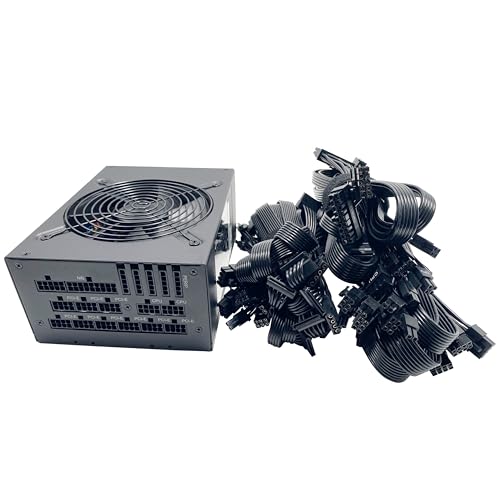
The BestParts 2000W unit is designed for multi-GPU server or workstation builds. Key features include AC input range 100-240V~, a broad amperage window, and a compact 20 x 15 x 9 cm form factor. Best for high-capacity compute rigs where modular cabling and reliable power delivery are essential. Limitations: basic feature notes don’t specify advanced protections beyond standard protections; verify compatibility with your motherboard and adapters before purchase.
Pstaroth 2000W Mining Power Supply

The Pstaroth 2000W model targets GPU mining rigs with 24PIN, multiple PCIe/SATA connectors, and active protection for high-temperature scenarios. It operates normally across 110V-240V input, offering a 90% conversion rate for efficiency. Best for users running 6–8 GPU configurations or Ethereum/other mining workloads. Caution: detailed protection modes aren’t fully disclosed; ensure your cooling setup can handle sustained loads in hot environments.
ASUS ROG Strix 1200W Platinum

Note: This section highlights a 1200W option for readers exploring high-end gaming builds with room to grow. The ASUS ROG Strix series emphasizes GaN MOSFET efficiency, GPU-First voltage stabilization, and robust cooling with large heatsinks. Best for enthusiasts who want superior heat management and quiet operation, but may not meet the 2000W target for multi-GPU miners. Choose this if your rig stays under 1500W and you value performance-per-watt and quiet operation.
SilverStone Hela 2500Rz Cybenetics Platinum

SilverStone’s Hela 2500Rz delivers Cybenetics Platinum efficiency with ATX 3.1 and PCIe Gen 5 support, making it highly suitable for modern RTX 40/50 GPUs. The unit includes four native 12V cables and multiple PCIe connectors. Best for high-wattage builds requiring PCIe 5.0 readiness and top-end efficiency. Limitation: real-world noise and temperature performance can vary with enclosure and airflow.
be quiet! Dark Power Pro 13 1600W

Be Quiet!’s Dark Power Pro 13 focuses on digital regulation and full-bridge LLC for signal stability, delivering 1600W with 80 Plus Titanium efficiency. It supports PCIe 5.0 GPUs and includes two 12VHPWR cables. Best for users needing extreme efficiency and low-noise operation in high-powered, workstation-like builds. Better for compact builds with adequate airflow; may be more than enough power for many single-GPU gaming rigs.
CORSAIR RM1000x ATX 3.1

Corsair RM1000x is a fully modular 1000W PSU with ATX 3.1 compliance and PCIe 5.1 support. It offers Gold efficiency and native 12V-2×6 connectors for clean builds. Best for high-performance gaming rigs or mid-to-high wattage workstations where modularity and efficiency matter. Limitation: wattage is below 2000W, so this selection is included for comparison to illustrate scaling options and future upgrade paths.
Rosewill VMG 1000W

Rosewill VMG 1000W focuses on ATX 3.0/3.1 readiness with full modular cables and PCIe 5.1 support. It uses 100% Japanese capacitors and a 120mm FDB fan for quieter operation under load. Best for mid-to-high wattage builds that require clean cabling and reliable long-term performance. Consider if your build will stay around 1000–1200W but you want upgradable headroom for future GPUs.
Buying Guide
What to consider when choosing a high-wattage PSU
- Wattage headroom: Match the PSU wattage to your GPU and CPU power draws plus overhead for spikes. For multi-GPU rigs or servers, aim well above your peak consumption.
- Efficiency certification: Look for 80 Plus Gold/Titanium/Platinum ratings to minimize heat and noise and to improve reliability under load.
- ATX 3.1 and PCIe 5 readiness: If you plan to run the latest GPUs, ensure native PCIe 5 connectors and ATX 3.1 compliance for better surge handling.
- Modularity: Fully modular cables help reduce cable clutter and improve airflow, which is crucial in dense builds.
- Cooling and acoustic performance: Higher-wower units may require robust cooling. Check fan size, fan technology, and enclosure airflow.
- Protection features: Over-current, over-voltage, short-circuit, and temperature protections protect both PSU and components.
- Warranty and service life: Longer warranties indicate confidence in reliability for critical rigs.
FAQ
- Do I really need a 2000W power supply for a gaming PC?
It depends on your configuration. Single high-end GPUs and CPUs may not require 2000W, but multi-GPU rigs, mining setups, or workstations with multiple GPUs can benefit from extra headroom to avoid instability. - What is ATX 3.1 and why does it matter?
ATX 3.1 supports improved power delivery and surge handling for modern PCIe 5.0 GPUs, reducing the risk of voltage spikes harming components. - Should I prioritize efficiency over wattage?
Yes, higher efficiency reduces heat and noise under load and can save energy over time, especially in power-hungry builds. - Is modular cabling important for a 2000W PSU?
Yes, modular cabling simplifies cable management in large builds and improves airflow and cooling. - What safety protections are essential in high-wattage PSUs?
Look for protections like OCP, OVP, SCP, OPP, and OTP to guard against overcurrent, overvoltage, short circuits, under/over temperature, and overload conditions. - Can a 2000W PSU power a standard gaming PC?
It can, but it’s often overkill for a typical gaming PC. It’s best suited for high-end, multi-GPU, or mining setups that require substantial headroom.