Best 19 Inch Rack Enclosures for IT Setups: A Comprehensive Guide
Looking for the right 19″ rack enclosure to organize IT equipment, servers, switches, and patch panels? This guide highlights top 19″ server rack enclosures, focusing on wall-mount and compact floor models that balance security, cooling, and accessibility. The selections are ideal for small to mid-size networks, home labs, or office IT closets. Each option is explained for who it’s best for, with practical pros and a clear caveat to help you choose confidently.
Summary table of chosen products:
| Product | Depth | U Capacity | Best For | |
|---|---|---|---|---|
| Sysracks 15U Wall Mount | 24″ deep | 15U | SMB IT closets needing robust cooling and shelves | Wall-mount depth may limit some deeper gear |
| NavePoint 18U Deluxe Wallmount | 24″ Deep | 18U | Larger wiring projects with glass doors | Heavy; wall mounting requires solid support |
| NavePoint 9U Wall Mount | 17.7″ Deep | 9U | Compact spaces with easy access | Less rack space for larger gear |
| Tecmojo 9U Wall Mount | 17.7″ Deep | 9U | Lockable glass for secure access | Depth limits very deep equipment |
| NavePoint 6U Wall Mount | 17.7″ Deep | 6U | Small configurations with clear glass | Limited expansion; 6U space |
Sysracks 15U Wall Mount Rack Cabinet

Best for mid-sized IT closets that need robust airflow and multiple shelves. This 24-inch-deep wall-mount cabinet supports 19-inch equipment like switches, patch panels, NAS devices, and PoE gear. It includes a fan and PDU options to help maintain stable temperatures for active devices.
Who it’s for: network administrators in small-to-medium offices or home labs needing a deeper wall-mount footprint and accessible cabling. Why selected: it combines professional-grade construction with ventilation and expansion space for growing hardware. Caution: wall-mounted depth can limit bulky equipment behind locked panels.
NavePoint 18U Deluxe IT Wallmount Cabinet

Best for projects requiring more rack space with a glass-front, locking door for visibility and security. The cabinet’s 24-inch depth supports a broader range of equipment while keeping cables accessible. It has a sturdy welded frame and high weight capacity for heavier gear.
Who it’s for: network installers and facilities managers managing several 19″ devices in a compact wall-mount footprint. Why selected: the larger 18U capacity accommodates more gear without stepping into full-floor rack territory. Caution: heavier unit requires solid wall anchoring to prevent mounting stress.
NavePoint 9U Wall Mount Cabinet

Best for limited spaces where 19″ equipment needs secure and organized housing. It features durable cold-rolled steel, locking side panels, and an adjustable layout to accommodate various devices. It’s suitable for both IT and A/V equipment installations in compact rooms.
Who it’s for: installers seeking a budget-conscious yet sturdy enclosure with easy customization. Why selected: 9U offers a balance between capacity and space efficiency. Caution: shallower depth can limit longer-depth servers or deep patch panels.
Tecmojo 9U Wall Mount Cabinet
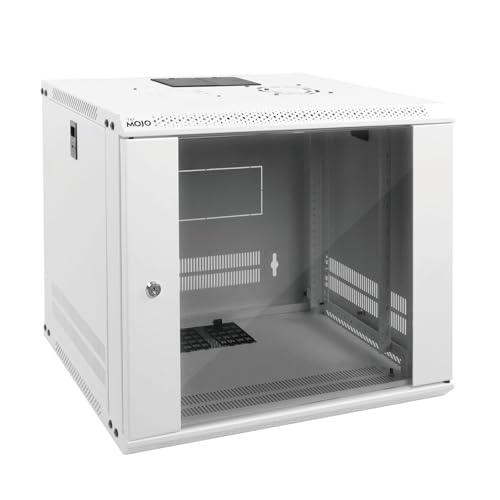
Best for secure installations with controlled access in a space-saving design. This model uses tempered glass front and lockable side panels, plus a built-in top fan for cooling. It supports standard 19″ equipment and offers adjustable rails for easier setup.
Who it’s for: IT teams needing clear visibility and security in a wall-mount format for smaller offices. Why selected: effective cooling and security features in a compact 9U footprint. Caution: limited depth may not fit very deep servers or large power supplies.
NavePoint 6U Glass Door Rack Enclosure
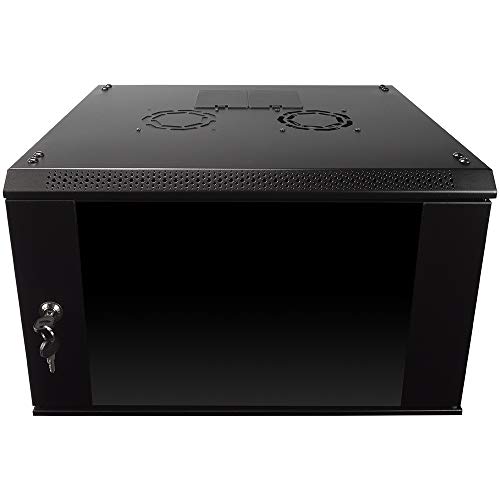
Best for small-scale deployments or offices that require a compact, secure display of equipment. The 6U cabinet features a glass door for quick visual checks and a locking mechanism to restrict access. It’s ideal for routers, switches, and compact patch panels in tight spaces.
Who it’s for: environments with space constraints and a need for lightweight, secure conduit for IT hardware. Why selected: its small size makes it easy to integrate into multipurpose rooms. Caution: limited expansion potential; plan for only smaller equipment sets.
Buying Guide: How To Choose The Right 19 Inch Rack Enclosure
What size and depth do you need? Start with the depth and U capacity. Wall-mount enclosures typically range from 6U to 18U and around 17.7″ to 24″ deep. Choose depth based on equipment depth and cable management space. Higher U capacity is better for growing racks, but requires more wall strength or floor space.
How important is cooling and airflow? Look for integrated fans or vented doors, especially for devices that generate heat like switches, NAS, and PoE equipment. Proper airflow reduces hot spots and improves device reliability.
Is security a priority? Lockable front doors, tempered glass, and side panels help protect equipment from tampering while still enabling airflow and visibility. For sensitive setups, consider enclosures with reinforced doors and anti-tamper features.
What about installation and access? Consider whether you need wall-mount, freestanding, or dual-access configurations. Removable side panels and adjustable rails ease installation and future reconfigurations. Cable access punchouts are a plus for clean cabling.
Which brand and warranty considerations matter? Reputable brands like NavePoint and Tecmojo offer sturdy steel construction, standard 19″ mounting, and reasonable weight capacities. Assess installation hardware included, serviceability, and the ease of door orientation changes when needed.
FAQ
- What is a 19″ rack enclosure? A 19″ rack enclosure is a standardized frame that houses network equipment, servers, and related devices with mounting rails spaced to accommodate 19-inch rack gear. It can be wall-mounted or freestanding, often with doors for security and ventilation.
- How do I choose the right depth? Measure the depth of your deepest device and add space for cables and airflow. If mounting on a wall, ensure the wall can support the cabinet’s weight and leaves room for cable management behind equipment.
- Do I need cooling features? Yes, cooling features like fans and vented doors help prevent overheating in devices such as switches, NAS, and PoE gear. Aim for top or rear airflow paths where possible.
- Is glass a pro or con for security? Glass doors provide visibility for monitoring but may be more vulnerable than solid doors. Lockable glass doors strike a balance between access control and visibility.
- What should I consider for future expansion? Choose a unit with higher U capacity or easy-add-on shelves. Consider modular shelves and removable side panels to adapt to changing equipment layouts.
- Are wall-mount enclosures suitable for all setups? Wall-mount enclosures save floor space and are ideal for closets or office corners with limited room. For larger networks, consider a freestanding cabinet with caster options.