Best in-Wall Power Kit for TV
Transform a cluttered wall behind your mounted TV into a clean, organized space with in-wall power kits. These solutions route power and low-voltage cables safely behind the wall, reducing visible cords and improving room aesthetics. The options below showcase kits that are ETL/UL certified, include installation tools, and offer multiple outlets or USB ports. Whether you’re installing a modern TV, a soundbar, or a streaming setup, these picks aim to deliver safer power routing and a polished look in under an hour.
Below is a quick comparison for your reference. The table highlights key attributes to help you pick a kit that fits your wall depth, device needs, and installation style.
| Product | Brand | Key Feature | In-Wall Rating |
|---|---|---|---|
| ECHOGEAR In-Wall Cable Management Kit | ECHOGEAR | Pre-wired, 6 ft extension, tree-planting initiative | In-Wall Certified |
| Mount-It! In-Wall TV Cable Concealer Kit | Mount-It! | Recessed power, 9 ft cord, drywall saw | In-Wall Safe |
| ECHOGEAR TV Cord Hider | ECHOGEAR | Dual outlet, 6 ft extension, wall template | In-Wall Safe |
| Perlegear Cord Hider | Perlegear | 2 outlets, USB ports, dust bag, drill template | UL/ SGS Certified |
| Celendor In-Wall Cable Management Kit | Celendor | 2 m power cord, 90° elbow plug, easy installation | Wall-rated |
ECHOGEAR In-Wall Cable Management Kit

This kit connects power and low-voltage cables behind the wall and comes with 3.75” diameter by 3.25” depth modules, a 6 ft extension cord, and a drywall hole saw attachment. It is designed for a quick 30-minute install using a drill and basic DIY skills. The system is pre-wired and ETL In-Wall Certified, which helps ensure electrical safety and code compliance. The manufacturer notes that modules can be placed up to 5 feet apart and includes a tree-planting initiative with each kit sold. If you’re coordinating a TV, streaming device, and soundbar, this option provides a compact solution without exposed cords. This kit focuses on simplicity and safety for in-wall power routing.
Key considerations: Verify wall depth and power needs, note that it requires a drill and basic cutouts, and ensure you have a suitable outlet or extension for current devices. The product emphasizes safety and post-purchase support, with a responsive team. It’s well-suited for standard living room setups where a quick, professional-looking install is preferred.
Mount-It! In-Wall TV Cable Concealer Kit

The Mount-It! kit focuses on a clean, organized entertainment area with a recessed opening that accommodates multiple HDMI, Ethernet, and AV cables. It’s designed for an easy DIY installation and is not hard-wired, making it suitable for renters or homeowners who want a pro-like look without licensed electrical work. A drywall saw, cutting template, and step-by-step instructions are included, enabling setup in under 30 minutes. The kit supports powering a TV and hiding associated cables with a single, integrated solution.
Considerations include the need for a nearby electrical outlet and the depth of your wall cavity to ensure the recessed opening fits your cables. The included tools help minimize guesswork, and the system’s plug-in design reduces complexity compared with a fully hard-wired approach. It’s a solid choice for those seeking versatility and speed without major electrical work.
ECHOGEAR TV Cord Hider for Wall Mounted TV
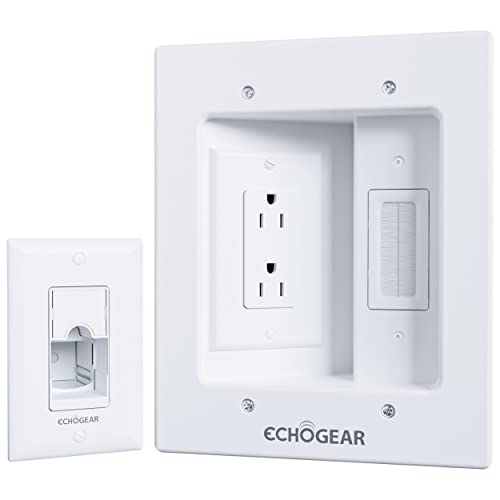
This in-wall cable management kit provides a dual outlet in-wall module to power two devices while concealing three low-voltage cables via a brush pass-through. It includes a wall template and a drywall saw, along with a 6 ft extension cord, to simplify installation. The design supports a clean look behind a wall-mounted TV and is built to be simple and quick to install. It’s particularly useful for setups with a soundbar, streaming device, and a TV that require flexible wiring behind the wall without a mess of cables on the surface.
Pros include an integrated dual outlet that helps accommodate oddly shaped plugs and multiple devices. The kit emphasizes a safe, code-compliant approach to powering wall-mounted devices, although users should confirm their wall depth and the clearance needed for the in-wall module and extension cord. It serves well for compact living rooms where aesthetics and cable management are priorities.
Perlegear Cord Hider With Outlets

Perlegear’s kit adds two AC outlets plus USB-A and USB-C ports, enabling charging for multiple devices at the TV area. It includes drill templates, a dust bag, drywall saw, and an extension cord for a complete install. The kit is UL and SGS certified, and uses fire-resistant materials aimed at safer power routing. The wings on the modules lock into place, helping keep cables secure behind the wall while maintaining a tidy appearance.
Key considerations include assessing how many outlets you need and whether USB ports are required for devices like smartphones or streaming remotes. The included drill tools help ensure a precise installation, while the safety certifications provide confidence for families with kids and pets. The Perlegear option balances power capacity with concealment, making it suitable for more device-dense TV setups.
Celendor In-Wall Cable Management Kit

Celendor’s wall kit emphasizes a streamlined installation with a 2 meter power cord and a 90-degree elbow plug to accommodate layouts where the TV sits away from a wall outlet. The kit includes a pre-wired approach for clean power routing and efforts to reduce visible wires behind the mounted TV. Installation details emphasize an easy, drill-based setup that works well for rooms with constrained space behind the TV unit.
Considerations for Celendor include ensuring the wall cavity depth supports the module size and that the included setup accommodates your TV’s power and audio needs. The 90° elbow plug design helps with tight configurations, making it a practical choice for compact media walls or units with limited space behind the screen. It provides a balanced option for a tidy, cable-free appearance.
Buying Guide: Key Purchase Considerations
When selecting an in-wall power kit for your TV, consider the depth of your wall cavity, the number and type of outlets you need, and whether you want USB charging alongside power. Look for UL or UL-listed/ SGS-certified components to ensure safety and code compliance. Tool inclusions such as hole saws, templates, and drywall saws can shorten installation time and reduce errors. Assess whether the system is plug-in or hard-wired, as plug-in designs are generally easier for renters or DIY enthusiasts who want to avoid licensed electrical work.
Cord length and flexibility matter for complex layouts—ensure the kit provides enough reach for your TV, soundbar, streaming devices, and any gaming consoles. Consider whether you need multiple low-voltage pass-throughs, USB ports, or a dual-outlet configuration to minimize surface cables. Depth compatibility is crucial: many kits specify minimum cavity depth to ensure the modules fit behind your wall. Finally, read product support details and warranty information, as post-purchase assistance can help with alignment and updates if you relocate or remodel.