Best Wall Mounted Switch Rack Solutions for Compact Networking Setups
Looking for a space-saving wall-mounted rack to organize switches, patch panels, and small servers? This guide presents five top-rated wall mount rack options, detailing who each is best for and why it fits limited spaces. Ideal buyers include home labs, small offices, and AV setups needing secure, accessible gear storage without clutter. Read on to compare sizes, depth, weight capacity, and mount features to choose the best fit for your equipment and space.
| Product | Best For | Depth | Weight Capacity | Why It Stands Out |
|---|---|---|---|---|
| Tecmojo 6U Wall Mount Server Cabinet | Small IT gear with secure front access | 17.72″ | Unknown into spec | Lockable glass door and side panels, configurable door orientation |
| Tecmojo 4U Wall Mount Rack (14″ Depth) | Shallow setups needing open access | 14″ | 50 kg (110 lbs) | Open useable frame, side cable access |
| Tecmojo 12U Open Frame Network Rack | Higher capacity wall/standalone needs | Open frame design; best with 12U | 130 lbs wall; 260 lbs floor | Includes two shelves and mounting hardware |
| StarTech 6U Wall Mount Network Rack | Ultra-compact spaces | 13.78″ | 44 lbs | Fully assembled; two-post design with deep integration |
| ECHOGEAR 10U Network Rack | Versatile, larger wall-mount with shelves | 20.4″ | 150 lbs | Includes two 1U vented shelves; complete hardware |
Tecmojo 6U Wall Mount Server Cabinet

Best for small IT setups that require secure access and flexible door orientation. This 6U cabinet features a lockable glass door and lockable side panels to prevent unauthorized access. The front door can be mounted on either side to match your swing preference, and fully adjustable rails support various 19″ equipment. The unit also includes top and bottom punch-outs for easy cabling. Choose this if you need secure, compact protection with adaptable installation.
Limitations: Weight capacity is not specified in the overview; consider verifying the load capacity for high-density equipment.
Tecmojo 4U Wall Mount Rack (14″ Depth)

Best for shallow installations that still need robust support. This 4U rack has a 14″ depth, a 110 lb (50 kg) capacity, and a sturdy cold-rolled steel build with an electrostatic powder coat. It’s ready-to-use out of the box, with side panel cable management and versatile placement options (wall, floor, or under-table). Opt for this when you want a straightforward, compact rack with good accessibility.
Limitation: Open frame may offer less enclosure security than fully enclosed cabinets; plan cable routing accordingly.
Tecmojo 12U Open Frame Network Rack

Best for higher-capacity wall-mounted or floor-standing needs. The 12U open-frame design supports heavy equipment with a wall-mounted capacity of 130 lbs and floor capacity up to 260 lbs. It includes two ventilated shelves, mounting hardware, and adjustable rails to accommodate a range of 19″ devices. Choose this when you require more U-space without a full enclosure.
Limitation: Open-frame racks offer less enclosure protection from dust or tampering. Ensure proper cable management to avoid clutter.
StarTech.com 6U Wall Mount Network Rack
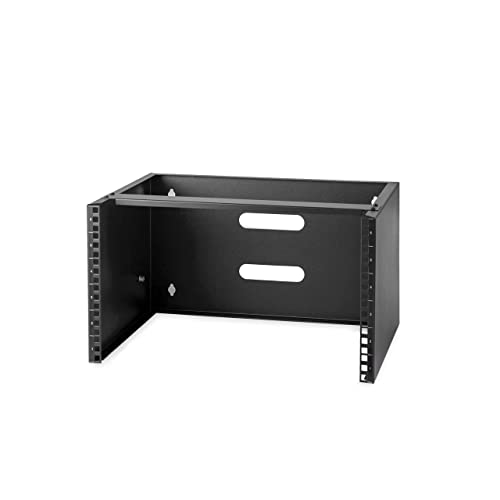
Best for ultra-compact spaces needing a solid, ready-to-install solution. This 6U wall mounting rack is 13.78″ deep with a 19.9 kg (44 lb) weight rating. It ships fully assembled and includes mounting screws and cage nuts, making installation quick. The cold-rolled steel construction adds durability, ideal for limited areas where mounting depth is a premium. Opt for this when space is critical and you want a maintenance-friendly unit.
Limitation: Moderate weight capacity means heavier equipment should be carefully planned and distributed.
ECHOGEAR 10U Network Rack

Best for users needing a larger wall mount with ventilation and shelves. The 10U rack supports up to 150 lbs and includes two 1U vented shelves plus mounting hardware. Its 20.4″ depth fits many mid-size networking and AV devices, and the open-frame design aids airflow and accessibility. Choose this when you require more U-space with practical ventilation and simple expansion.
Limitation: Heavier configurations may require additional wall reinforcement or alternate mounting methods.
Buying Guide
What to consider when choosing a wall-mounted rack?
- Depth and footprint: Measure available wall space and ensure the rack depth fits behind furniture or in alcoves. Deeper models may limit door swing or cable routing.
- Weight capacity: Align rack weight limits with planned gear. Overloading can strain mounts and reduce stability.
- Enclosure vs open-frame: Enclosed cabinets offer security and dust protection; open-frame racks boost airflow and accessibility for quick swaps.
- Mounting orientation: Some racks support top/bottom access or reversible doors. Confirm door swing options match room layout.
- Ventilation: Consider built-in fans or vented shelves for heat-sensitive equipment to prevent hotspots.
- Cable management: Look for side panel access, cable knockouts, and included shelves or stops to organize cables neatly.
- Expansion potential: If your network grows, prefer modular or larger U-capacity with additional shelves and mounting options.
Comparative quick tips
- Best for compact spaces with security needs: Tecmojo 6U Server Cabinet and StarTech 6U Rack.
- Better for higher capacity or open ventilation: Tecmojo 12U Open Frame and ECHOGEAR 10U.
- Choose this if you want ready-to-install hardware with minimal setup: StarTech 6U and Tecmojo 4U.
FAQ
- What is the difference between a wall-mount rack and a wall-mount cabinet?
Cabinets are enclosed and offer more security; wall-mount racks are typically open-frame or semi-enclosed and emphasize airflow and accessibility. - Can these racks support standard 19″ equipment?
Yes, all listed units are designed for standard 19″ IT and AV equipment. - How do I choose the right depth?
Compare the deepest equipment you plan to mount and select a rack with at least a few inches of clearance for cables and airflow. - Is wall mounting safer than floor mounting for equipment?
Wall mounting saves floor space and can reduce trip hazards, but ensure the wall is rated for the weight and that mounting hardware is appropriate. - Do these racks come with hardware to install equipment?
Most listed options include mounting screws, cage nuts, and sometimes shelves; verify with the product listing.