Best in-Drawer Power Outlet Solutions for Hidden Home Charging
Response to buyers seeking an in-drawer power outlet: these options keep cords out of sight while delivering reliable charging and power, ideal for desks, bathroom vanities, and kitchen cabinets. Best for compact spaces, quick installs, and clutter-free surfaces. Below is a curated set of five in-drawer outlets, with guidance on who each option fits best and why it stands out.
Summary of selected products:
| Product | Best For | Key Benefit |
|---|---|---|
| JACEPFY Drawer Outlet with USB C PD20W Fast Charger Station | Tech enthusiasts and dense USB charging needs | Dual USB-C / USB-A with smart triage |
| Compact in-Drawer Outlet with Cord Management Arm (2 USB-A) | Small drawers, light-duty use | Two USB-A ports plus two 15A outlets |
| Docking Drawer Blade in-Drawer Outlet with Safety Shutoff | Medium-use electronics, safety-first setups | Integrated thermostat for trip protection |
| Docking Drawer Blade with USB-A & USB-C | Multi-device charging in drawers | Includes USB-C and USB-A options |
| Compact (PD30W) USB-C In-Drawer Docking Station | Fast PD charging in narrow spaces | PD30W USB-C and 15A outlets |
JACEPFY Drawer Outlet With USB C PD20W
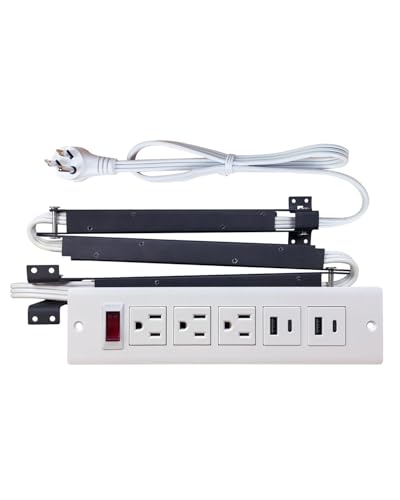
The JACEPFY model features 20W PD fast charging via a USB-C port and a USB-A port for stable 5V 3.1A. It uses intelligent device triage to automatically match current to each device, enabling safe simultaneous charging without overheating. The cord management arm is crafted from rust-proof galvanized sheet metal to resist humidity and maintain drawer operation. It is UL certified for electrical safety.
Best for: tech-heavy setups where two devices need fast charging at once and drawer aesthetics matter. Choose this if you want smart triage and robust cord protection in a single unit. Caution: ensure your drawer dimensions accommodate the built-in arm and outlets.
Compact In-Drawer Outlet With Cord Management Arm

This compact unit includes two USB-A ports and two 15-amp outlets. It is designed for shallow drawers and relies on a cord-management arm to keep wires orderly, reducing clutter on the countertop. It’s marketed for long-term durability with cycle-tested reliability. Best for: small drawers and light daily charging tasks. Caution: USB-C charging is not available on this model, limiting fast-charging options for newer devices.
Docking Drawer Blade In-Drawer Outlet With Safety Shutoff

This in-drawer outlet emphasizes organized device charging while preserving drawer functionality. It includes two 15-amp outlets and a safety shutoff feature to prevent overheating. The integrated cable management arm protects cords from fraying and keeps wires tidy. Best for: situations where safety and neatness are priorities. Limitation: lacks USB-C/PD fast charging, which may be a drawback for users with newer devices needing rapid power.
Docking Drawer Blade With USB-A & USB-C

Equipped with both USB-A and USB-C options, this model supports flexible charging for multiple devices within a drawer. It maintains tidy cable management and includes an ETL-listed safety profile. Best for: households with several devices needing USB-C and USB-A charging. Caution: performance may depend on the total power draw of connected devices and outlet capacity.
Compact (PD30W) In-Drawer Docking Station

This compact PD30W USB-C version provides two USB-C PD ports plus two 15A outlets within a slim drawer-friendly footprint. It’s designed for faster PD charging and a compact form factor, making it a solid choice for narrow spaces. Best for: users prioritizing PD30W USB-C charging in a small drawer. Caution: ensure your devices can share the PD power between ports without triggering limits.
Buying Guide: In-Drawer Power Outlet Essentials
What should you consider when choosing an in-drawer power outlet? Here are practical asks and answers.
- What charging speeds do you need? If you require fast PD charging for USB-C devices, prefer models with PD-enabled ports (e.g., PD20W or PD30W).
- How much drawer space is available? Measure depth and width; some units use a cord management arm that may require extra room.
- What outlets are essential? Decide between USB-A, USB-C, and traditional 15A outlets based on your devices.
- Is safety a priority? Look for UL or ETL listings and features like integrated shutoffs or thermostats to prevent overheating.
- Cord management quality matters. A robust cord arm helps prevent tangling and protects cords during drawer movement.
- Material and durability. Rust-resistant metals and flame-retardant housings improve longevity in humid areas.
- Compatibility with drawers. Some products are better suited for shallow or narrow drawers; check installation notes and mounting options.
FAQ
- Do these in-drawer outlets require professional installation? Most are designed for straightforward DIY installation with basic hardware; always follow the manufacturer’s installation instructions.
- Can I charge multiple devices at once? Yes, many models feature a combination of USB ports and traditional outlets to support several devices simultaneously.
- Are these outlets safe for bathrooms and kitchens? Look for UL or ETL certification and moisture considerations recommended by the product guidelines.
- Will the power supply fit in a shallow drawer? Check the product dimensions and the drawer’s internal depth to ensure compatibility.
- Do in-drawer outlets affect drawer function? Many models are designed to preserve full drawer operation, with cable management to prevent snagging.
- Is PD charging widely supported? USB-C PD ports are common for newer devices, but verify port specs (PD20W, PD30W) for your gear.