Best Pop Up Socket Outlet Picks for Kitchens and Desks
Answering the need for clutter-free power access, pop up socket outlets are ideal for clean countertops, desks, and island workspaces. This guide covers top options that balance safety, practicality, and space-saving design. Best for home cooks, office workers, and tech-heavy desks, these outlets deploy neatly and rise when needed. Read on to compare features, installation ease, and where each model shines. The table below highlights five standout products to help you choose quickly.
| Product | Key Benefit | Best For |
|---|---|---|
| Jgstkcity 2.5-Inch Pop Up Outlet | Multiple outlets with USB-C and USB-A, tamper-resistant | Home, small offices, conference rooms |
| Redcomets Pop Up Countertop Outlet | Wireless charging pad plus 4 outlets | Desks and workstations needing wireless charge |
| ANNQUAN 2-Inch Space Saver Pop Up | Compact, USB-C PD, splash resistant | Tight spaces, kitchens, offices |
| SURAIELEC GFCI Pop Up Outlet | GFCI protection, USB ports, splashproof | Kitchens, offices with water exposure |
| Kungfuking Pop Up Electrical Outlet | 3 AC + 2 USB, retractable design | Islands, conference desks, high device load |
Note: Each product below offers distinct advantages. Consider hole size, depth, and whether you need wireless charging, GFCI protection, or motorized lifting for heavy daily use. When in doubt, choose models with tamper resistance (TR) and ETL or equivalent listing for safety compliance.
Jgstkcity Pop Up Outlet With USB Ports

The Jgstkcity unit fits a 2.5-inch (60mm) hole and uses a built-in spring-loaded pop-up mechanism. It offers 4 AC outlets plus 2 USB-C and 2 USB-A ports, enabling multiple devices to charge simultaneously. The design hides under the counter when not in use and rises for access, making it ideal for granite or quartz countertops. Best for: small kitchens, conference rooms, and compact home offices needing up to eight charging devices at once. Caution: ensure countertop hole is precisely 2.5 inches to avoid fit issues.
Redcomets Pop Up Countertop Outlet With Wireless Charging

This model combines a 3.94″ hole-opener with a 4-outlet receptacle plus a wireless charging pad (up to 15W). The spring-loaded mechanism rises with a push, and can remain flat for charging devices via wireless mode when concealed. Best for: desks and kitchen islands where wireless charging adds convenience. Limitation: requires a larger countertop opening and may be bulkier when extended.
ANNQUAN 2-Inch Space Saver Pop Up Outlet

The ANNQUAN space-saver unit fits a compact footprint with 2 USB PD ports and 2 AC outlets. It retracts flush when not in use and sinks about 8 inches beneath the countertop. Best for: tight spaces, home offices, and small kitchen islands where maximum surface area matters. Caution: verify bottom clearance on your desk or island to ensure full retraction without obstruction.
SURAIELEC GFCI Pop Up Outlet

The SURAIELEC unit provides 4 GFCI outlets with 1 USB-C and 1 USB-A port (total USB output up to 24W). It is splashproof and ETL listed, suitable for kitchens and workspaces with moisture exposure. Best for: areas requiring surge/splash protection and reliable multi-port charging. Limitation: GFCI outlets may introduce a slight delay in charging high-wattage devices during peak draw.
Kungfuking Pop Up Electrical Outlet
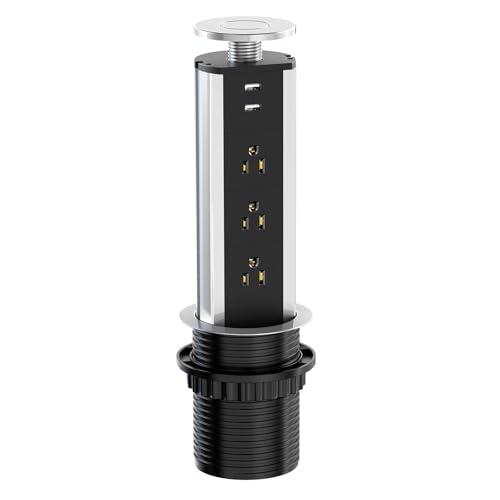
The Kungfuking unit features 3 AC outlets and 2 USB ports within a retractable design, supporting up to 1875W. It’s well-suited for kitchen islands and conference desks that demand flexible access to power and charging. Best for: devices with higher power needs and busy workstations. Caution: ensure the hole size and depth on your surface accommodate the 1875W rating safely.
Buying Guide
What to consider when choosing a pop up socket outlet:
- Hole size and installation: Match the unit’s required opening to your countertop or desk to ensure a flush, neat fit. Some models provide hole saws or require 2.5″ to 4.3″ holes.
- Power and outlets: Count how many AC outlets and USB ports you need. Consider PD USB-C if you have fast-charging devices.
- Protection and certifications: Look for tamper resistance, splashproof or splash-rated designs, and ETL or UL listings for safety.
- Retractability and mounting: Decide between manual pop-up versus motorized lifting. Motorized versions may offer smoother operation but could be heavier or pricier.
- Wireless charging: If you want a surface for wireless charging, choose models with built-in Qi pads and verify compatibility with your devices.
- Space and aesthetics: For high-end countertops, a recessed design hides the outlet fully and preserves surface room for food prep or work.
FAQ
- Q: Will these outlets work with granite or quartz countertops? A: Yes, most are designed to recess into solid surfaces and pop up for use, with ring fittings and flush mounting for a clean look.
- Q: Are these outlets child-friendly? A: Many models include tamper-resistant receptacles to reduce risk of accidental shocks by children.
- Q: Do I need a professional installer? A: Installation varies; some models are DIY-friendly with standard hole sizes, while others may require wiring by a licensed technician.
- Q: Can I use wireless charging while the outlet is hidden? A: Some models allow wireless charging when the unit is retracted; verify the product features before purchasing.
- Q: How many devices can I charge at once? A: It depends on the model; check the number of AC outlets and USB ports, and consider PD USB-C for faster charging of compatible devices.
- Q: Are these outlets splashproof? A: Several models offer splash resistance or splashproof design for kitchens and wet areas; confirm IP or splash ratings in specs.