Best Electrical Outlet With Ethernet Port for Modern Home Setups
Finding the right electrical outlet with an Ethernet port helps you combine power and wired network access in a single wall or surface mount. This guide highlights five compatible options, explains who each is best for, and shows how to choose based on your setup. Designed for American homes, these picks cover wall plates, duplex outlets, and powerline solutions that integrate Ethernet alongside power. Ideal buyers include home theater enthusiasts, remote workers, multi-device households, and renters wanting quick, non-permanent network upgrades.
BOPLAT 2 Gang Power Outlet With CAT6 Ethernet Port

The BOPLAT 2 Gang combines a 20 Amp power outlet with a CAT6 Ethernet port on a single, double-gang plate. This is best for users who want a compact, on-wall solution to power a device and provide a wired network connection from the same location. The design includes a tamper-resistant feature to improve safety for households with children. It supports screw terminals (recommended) and push-in options for flexible wiring. Best for: home entertainment setups, workstations, and shared living spaces needing both power and wired networking in one plate. Limitation: only one CAT6 Ethernet port per plate, which may limit if you need multiple network drops from a single location.
TP-Link AV1000 Powerline Ethernet Adapter Kit

TP-Link’s AV1000 kit extends Ethernet over existing electrical wiring, delivering up to AV1000 speeds and a range suitable for multi-story homes. This solution is ideal for rooms far from the router where running new Ethernet cables isn’t practical. It’s best for users who want reliable wired connectivity in rooms lacking a network jack, such as living rooms or bedrooms. Caution: actual speeds may be limited by the home’s electrical wiring and network plan.
BOPLAT 20Amp Power Outlet With Ethernet HDMI Port Wall Plate
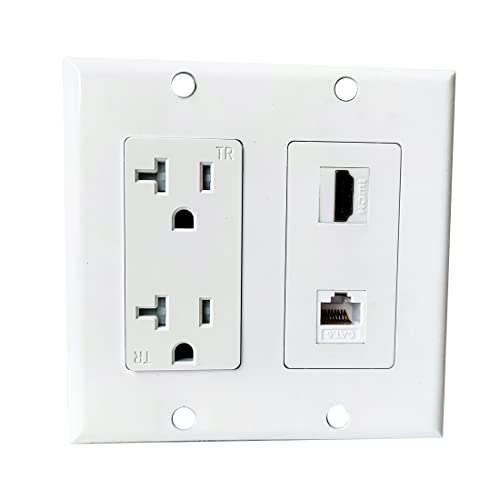
This double-gang plate merges a 20A power outlet with both CAT6 Ethernet and an HDMI port in one wall plate. It’s best for home entertainment centers where you want to connect laptops or streaming devices to Ethernet and HDMI from the same location. Safety features include tamper-resistant design and recommended screw-terminal wiring for secure installations. Choose this if you want both wired networking and HDMI connectivity from the same install point. Limitation: HDMI performance depends on device compatibility and cable quality, not just the plate itself.
Phizli HDMI USB Outlet Charger Wall Plate

The Phizli wall plate packs 2 power outlets, dual USB charging ports, an HDMI port, and a CAT6 Ethernet jack in a single unit. This is best for media-rich spaces where you want ready access to power, USB charging, Ethernet, and HDMI without multiple faceplates. It’s suitable for home offices, media rooms, or dorm-style apartments as a compact all-in-one wall solution. Caution: USB ports’ charging speed may vary with device; ensure the wiring and installation follow safety guidelines for mixed-load outlets.
TP-Link AV600 Powerline Ethernet Adapter Kit

The AV600 kit provides another powerline option with up to 600 Mbps speeds for wired networking across a home’s electrical wiring. It’s best for rooms where a 600 Mbps connection is sufficient for streaming, conferencing, or light gaming, without needing a new Ethernet cable run. It’s a solid choice for multi-room setups lacking centralized Ethernet access, though speeds are tied to electrical conditions and line quality.
RiteAV 15 Amp Round Power Outlet 1 Port Cat6 Shielded Ethernet Wall Plate

This round 15 Amp Cat6 shielded Ethernet wall plate offers a compact, round-face design with a single Cat6 port and an integrated power outlet in a single box. Best for spaces with traditional round-face receptacles or when a low-profile, non-rectangular plate is preferred. Limitation: fewer outlets or ports per plate compared to larger double-gang designs; plan placements accordingly for multi-device setups.
Buying Guide
- Number of ports vs. space: If you need multiple network connections from one location, choose multi-port plates or kits with extra Cat6 jacks or multiple adapters.
- Voltage and amperage compatibility: Confirm the outlet’s amperage (15A vs 20A) matches your circuit. Higher amperage outlets are safer for power-heavy devices.
- Wiring method: Screw terminals are typically safer for secure connections; push-in terminals can be convenient but may loosen over time if not installed correctly.
- Safety features: Tamper-resistant (TR) design helps prevent accidental insertion of objects by children and is common in modern outlets.
- Network type: Cat6 provides higher performance than older Ethernet standards, while powerline adapters extend network access through existing electrical wiring when running new cables is impractical.
- Compatibility with devices: Consider whether you need HDMI, USB charging, or coaxial options alongside Ethernet and power in the same plate.
- Installation location: Plan placements for desks, entertainment centers, and common areas to minimize cable clutter and maximize wired reliability.
Frequently Asked Questions
- What is the main benefit of an outlet with Ethernet? It delivers both power and a wired network connection from a single wall plate, reducing cable clutter and potentially improving network stability.
- Are these outlets safe for children? Many options use tamper-resistant designs to help prevent hazards from insertion of small objects.
- Will powerline adapters replace Wi‑Fi? They complement Wi‑Fi by extending wired connectivity where Wi‑Fi coverage is weak, but they rely on home wiring and may not match the speed of a direct Ethernet cable.
- Do all Ethernet ports on these outlets support gigabit speeds? Not all do; speeds depend on the device and the overall network plan. Check the product’s stated Ethernet capabilities to match your needs.
- Can I install these myself? Many outlets are designed for standard home wiring, but consult local electrical codes and consider professional installation for 20A circuits or complex setups.
- What should I consider before buying? Assess the number of network drops needed, the room layout, whether HDMI or USB ports are beneficial, and the compatibility with your router or powerline infrastructure.
| Product | Best For | Key Feature | Limitations |
|---|---|---|---|
| BOPLAT 2 Gang CAT6 | Single-location power + Ethernet | 20A rated, CAT6 jack | One Ethernet port per plate |
| TP-Link AV1000 Kit | Rooms far from router | AV1000 speeds over powerline | Performance depends on wiring |
| BOPLAT 20Amp Power Outlet With HDMI | Entertainment centers | Ethernet + HDMI on one plate | HDMI performance varies by devices |
| Phizli HDMI USB Wall Plate | All-in-one wall convenience | HDMI, CAT6, USB, USB charging | USB charging may vary by device |
| TP-Link AV600 Kit | Budget wired expansion | Up to 600 Mbps over powerline | Speed limited by wiring conditions |
These options provide practical paths to adding Ethernet ports to electrical outlets in American homes. When selecting, prioritize safety, space, and the required network speed. By pairing the right outlet with your router, HDMI needs, or USB charging requirements, you can create a streamlined, multi-functional wall installation that reduces cable clutter while expanding wired connectivity.