Best Clamp-on Current Monitors for Real-Time Home Energy Tracking
Looking for a clamp-on current monitor to track household energy use in real time? This article highlights five top options, compares their core strengths, and explains who they’re best for. Each product is evaluated for ease of installation, app support, and the practicality of insights you’ll gain. Ideal buyers include homeowners monitoring HVAC or solar, DIY enthusiasts wanting circuit-level visibility, and renters seeking smart-energy solutions without intrusive wiring.
Summary table
| Product | Best For | Key Strength | Notes |
|---|---|---|---|
| eMylo 2 Channel WiFi Power Meter | Smart homes with Tuya/Alexa | Two 80A clamps; real-time energy by hour/day | Requires WiFi, Tuya/Smart Life app |
| WiFi Home Energy Monitor with 3 CT Clamps (Nestool) | Panel-level monitoring | 3 circuits; clear circuit insight | Electrical wiring install; electrician advised if unsure |
| AC Current/Voltage Panel Meter (MORNING GROUP) | Budget, easy installation | Split-core CT; alarms and data storage | Basic features; good value |
| Smart Home Energy Monitor 2×80A (LyteSolar) | Bi-directional or solar setups | Dual-channel real-time tracking | 2.4 GHz WiFi; Tuya/Smart Life app |
| Shelly EM Gen3 + 50A Clamp | Constrained spaces; take-anywhere monitoring | Compact, built-in relay control | Single-phase; includes 50A clamp |
eMylo 2 Channel WiFi Power Meter

The eMylo monitor uses two 80A clamp sensors and 100–240V AC input to provide real-time readings of voltage, current, power, and energy. It records hourly, daily, monthly, and yearly usage, helping you identify high-consumption appliances. The device integrates with Tuya and supports Alexa and Google Assistant via the Smart Life/Tuya ecosystem, enabling automation scenarios with other smart devices. This model is best for tech-savvy homeowners who want multi-channel energy visibility and voice/app-driven automation. Caution: setup and pairing may be more involved for non-technical users, and real-time alerts rely on a stable WiFi connection.
Why choose this? Best for households looking to automate energy routines across multiple devices and track long-term trends with push notifications. It’s especially suitable for users who already use Tuya-compatible devices.
WiFi Home Energy Monitor with 3 CT Clamps
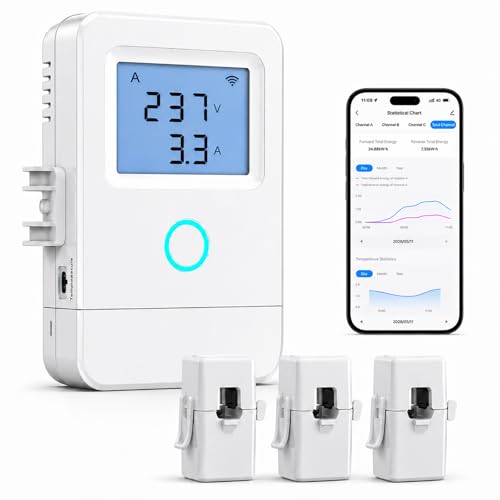
This panel-level monitor includes three current transformers to watch three circuits simultaneously. It supports AC 100–240V and focuses on major loads like HVAC, water heaters, and solar-related circuits. Installation typically requires a qualified electrician, especially when wiring into an electrical panel. Smart Life/Tuya app access provides real-time voltage, current, power, and energy tracking. It’s ideal for homes that want a clear view of three separate circuits and straightforward app control. Caution: professional installation is recommended if you’re not familiar with panel wiring.
Why choose this? Best for homeowners who want circuit-specific visibility and feasible installation by a pro, with solid app-based monitoring for quick comparisons across channels.
2 Pieces AC Current Voltage Amperage Power Energy Panel Meter

This kit provides a digital multimeter-style panel with a split-core current transformer for easy installation. It can display voltage, current, active power, energy, frequency, and power factor simultaneously. An overload alarm function helps prevent unnoticed surges, and data is automatically stored after power loss to minimize data gaps. Choose this for quick, cost-effective panel monitoring in smaller setups or for enthusiasts who want direct, clear readouts without extensive networking. Caution: feature depth is more basic than multi-channel options.
Why choose this? Best for budget-conscious users who want essential monitoring with alerting and offline data retention capabilities.
Smart Home Energy Monitor 2×80A

The LyteSolar energy monitor features two independent 80A sensing channels, enabling real-time monitoring of major household circuits such as HVAC, furnaces, water heaters, and large appliances. It supports bi-directional power tracking, which is useful for homes with solar panels or backup power systems. The device connects via 2.4 GHz WiFi and integrates with Tuya or Smart Life apps for ongoing visibility of voltage, current, power, and energy over time. This is a strong pick for households seeking dual-channel clarity and solar-ready tracking. Caution: ensure compatibility with your solar configuration and check app support in your region.
Why choose this? Best for homes with solar energy or bidirectional power needs, offering clear dual-channel insight and historical data trends.
Shelly EM Gen3 + 50A Clamp

Shelly EM Gen3 is a compact, Wi-Fi-enabled energy meter with a 50 A clamp included. It monitors total power across a single phase and allows control via a connected relay to turn off non-essential devices automatically. It pairs with Alexa, Google Home, and Home Assistant, supporting local data logging and real-time tracking. This option is ideal for tight spaces or retrofits where minimal hardware footprint is important. Caution: single-phase use; consider expansion needs if you want more channels in the future.
Why choose this? Best for space-constrained installations and users who want simple automation alongside energy monitoring.
Buying Guide: Key Factors To Compare
What should you check before buying a clamp-on current monitor?
- Number of channels: Do you need single or dual/multi-channel monitoring for separate circuits or solar setups?
- Current range: Ensure the clamp supports your highest expected current on each circuit.
- Voltage compatibility: Most devices operate 100–240V AC; confirm your electrical system matches.
- App and ecosystem: Decide whether you prefer Tuya/Smart Life, or Alexa/Google Home compatibility for automation.
- Installation type: Some monitors require panel wiring; others clip around a conductor or fit behind outlets.
- Data access: Look for real-time readings, historical data (hourly/day/month/year), and notification support.
- Bi-directional tracking: Consider this if you have solar, microgrids, or bidirectional power flows.
- Upgrade path: If you expect to expand, choose a model that can support more channels or a larger total current.
Frequently Asked Questions
- What is a clamp-on current monitor best used for?
It is used to monitor real-time electrical usage on one or more circuits without invasive wiring, helping identify high-load appliances and manage energy costs. - Can these monitors work with smart assistants?
Yes, many models integrate with Tuya/Smart Life apps and support Alexa or Google Assistant for automation and voice control. - Do I need a professional to install panel-level monitors?
Panel-level monitoring often requires wiring into the electrical panel; a qualified electrician is recommended for safety and code compliance. - Is bi-directional monitoring important?
Bi-directional monitoring is valuable for homes with solar or back-feed systems, as it shows both consumption and energy generation. - How do I choose the right number of channels?
For single loads or simple setups, a 1- or 2-channel device may be enough; multi-channel models suit homes with several major circuits or solar connections. - Do these devices log data locally or cloud-based?
Many offer cloud-based app access with optional local data logging; some include automatic data storage after outages. Check the product spec for specifics.