Best Barometric Pressure Data Logger for Accurate Environmental Monitoring
Looking for a reliable barometric pressure data logger to track temperature, humidity, and pressure? This guide highlights five top options that balance accuracy, ease of use, and data export formats. Each pick suits different buyers—from lab and warehouse managers to field technicians. Use the quick table below to compare key features at a glance.
| Product | Best For | Key Range Highlights | Data Export |
|---|---|---|---|
| Gain Express USB Temperature Data Logger | All-rounders needing Windows reports | -30 to 70°C, 0.1–99.9% RH, 300–1100 hPa | PDF & CSV/Excel |
| TEKCOPLUS 3-in-1 USB Data Logger | Simple setup with USB storage | -30 to 70°C, 0.1–99.9% RH, 300–1100 hPa | PDF & CSV |
| TEKCOPLUS USB Temperature Humidity Data Logger | Multilingual, plug-and-play | -30 to 70°C, 0.1–99.9% RH, 300–1100 hPa | PDF & Excel |
| Extech SD700 Datalogger | High-contrast display, Excel export | Barometric pressure, RH, Temp | Excel via SD card |
| Triplett RHDL40 Data Logger | High-capacity logging | 16,000 readings per sensor | PDF or CSV via USB |
Note: All products listed support barometric pressure alongside temperature and humidity. The table helps identify who benefits most from each option, such as managers needing easy Excel export or technicians requiring robust logging capacity.
Gain Express USB Temperature Data Logger

Best for users who want a straightforward, Windows-based workflow. This logger records temperature, humidity, and pressure in real time, with a wide range suitable for lab and warehouse environments. It provides PDF graphics and Excel reports via built-in software and supports six languages. Sampling interval and alarm settings are adjustable on the computer, with no extra reader needed.
Who it’s best for: IT-led facilities teams and QA personnel who need easy PDF/Excel reports and multilingual support. Caution: Requires Windows OS; no cross-platform driver support mentioned.
TEKCOPLUS 3-in-1 USB Data Logger

Selected for its true 3-in-1 capability—temperature, humidity, and barometric pressure—with instant USB storage. It supports up to 16,000 data groups and is compatible with Windows XP through 11. Data can be accessed without drivers, and reports export to PDF and CSV. It’s a strong choice for environments needing a simple plug-and-play device without software setup hassles.
Best for: Small labs and cold-chain workflows that value quick data access and easy export. Limitation: USB storage is the primary interface; advanced analytics may require opening PDFs or CSVs outside specialized software.
TEKCOPLUS USB Temperature Humidity Data Logger
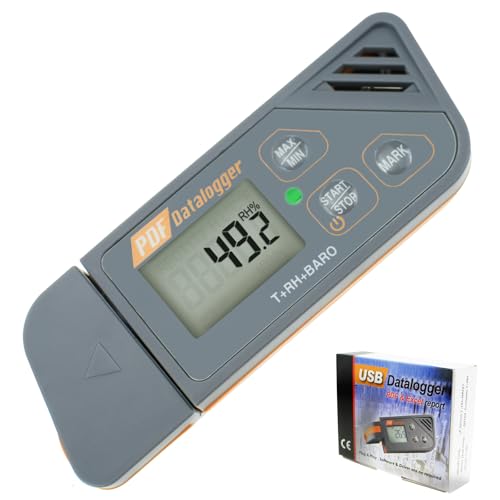
Choose this if you need a fully multilingual, plug-and-play data logger with robust reporting options. It records temperature, humidity, and barometric pressure in real time, with software that generates reports in PDF (graphics) and Excel formats. The device emphasizes language support and easy configuration of sampling intervals and alarm ranges.
Best for: Global facilities with multilingual teams and mixed Windows environments. Caution: Some users may prefer dedicated software for advanced data processing beyond basic reports.
Extech SD700 Barometric Datalogger

Notable for a triple LCD display that shows pressure, humidity, and temperature at a glance. It includes an SD card slot for direct Excel-ready data storage, eliminating software compatibility concerns. Customizable sampling rates from 5 seconds to 10 minutes support both rapid lab monitoring and long-term warehouse tracking.
Best for: Users who want immediate on-device readability and straightforward Excel export. Limitation: Reliance on SD card for data storage may require card management for frequent data dumps.
Triplett RHDL40 Data Logger

Selected for high-capacity logging, recording 16,000 readings per sensor with USB data access. It supports PDF reports with graphs and Excel (.csv) exports, plus password protection and user-programmed alarms. The device suits demanding monitoring tasks where data integrity and offline analysis are essential.
Best for: Industrial or lab environments needing large data sets and secure access. Caution: The user interface and software may require familiarity with exporting and formatting in PDF/CSV formats.
Buying Guide: How to Choose a Barometric Pressure Data Logger
What measurement needs should drive your choice? Consider these practical questions to identify the right fit.
What to monitor and how often?
Decide on the required sampling interval. Short intervals capture rapid changes in labs, while longer intervals suit long-term warehouse monitoring.
What data formats do you need?
PDF reports with graphics are convenient for sharing findings; CSV/Excel exports suit data analysis in spreadsheets. Some devices offer both, others only one format.
Is plug-and-play simplicity important?
USB-only models are easiest to use but may tie you to a PC. If you need cross-platform access, look for devices with no driver requirements or cross-OS compatibility.
How important is multilingual support?
Multilingual software can reduce setup time for global teams. If your operation spans multiple countries, this can streamline reporting.
What about storage capacity?
High-capacity loggers prevent frequent data downloads. If you cannot connect to a PC often, choose models with large internal memory or SD card slots.
FAQ
- What is a barometric pressure data logger used for? It records temperature, humidity, and atmospheric pressure over time to monitor environment conditions in labs, warehouses, or cold chains.
- Do these devices require special software? Some use built-in software that creates PDF and Excel reports; others may rely on standard file exports. Check driver requirements for your computer OS.
- Can I read data without a dedicated reader? Yes, many loggers store data in PDF, CSV, or Excel formats that you can open on standard computers without extra hardware.
- Is multilingual support necessary? It helps in global teams but is not essential for all buyers. Choose based on your language needs.
- What is the difference between 3-in-1 vs single-parameter loggers? 3-in-1 loggers measure temperature, humidity, and pressure simultaneously, offering a complete environmental snapshot in one device.
- What should I consider for field use? Look for IP-rated waterproofing (IP65 or higher), rugged housings, and portable power options if you need mobility.