Best Built in USB Charging Stations for Nightstands and Desks
Direct answer: built-in USB charging stations are ideal for compact furniture, desks, and bedside tables, delivering organized, multi-port charging without clutter. This guide highlights five top options suited for different needs—from high-total-output hubs to slim, furniture-integrated strips. Best for: small-space setups, heavy device households, travelers who want integrated solutions, and those prioritizing USB-C PD charging. The table below summarizes the five picks and their standout strengths.
| Product | Why It Stands Out |
|---|---|
| CCCEI Recessed Power Strip | Nice balance of USB-C PD 20W and USB-A 18W, with 2 standard outlets and recessed design for furniture use |
| Upoy USB Charger Upoy | Compact multiport hub with 4 USB-A and 2 USB-C ports, strong total 45W, travel-friendly |
| Roruite USB C Charging Station | 10-port block with 6 USB-C PD ports and 4 USB-A, high total 200W for multiple devices |
| SAIPKYGS 900W Charging Station | 12-in-1 with 8 USB-C and 4 USB-A, smart charging with high total output |
| TenTrend Flat Plug Power Strip Tower | 10ft cord, 12 outlets, 8 USB ports including 2 PD 20W USB-C, space-saving vertical tower |
Use this table to compare form factor, port mix, and power delivery. The sections below provide detailed, objective overviews for each product, including best-for scenarios and practical cautions.
CCCEI Recessed Power Strip With USB Ports
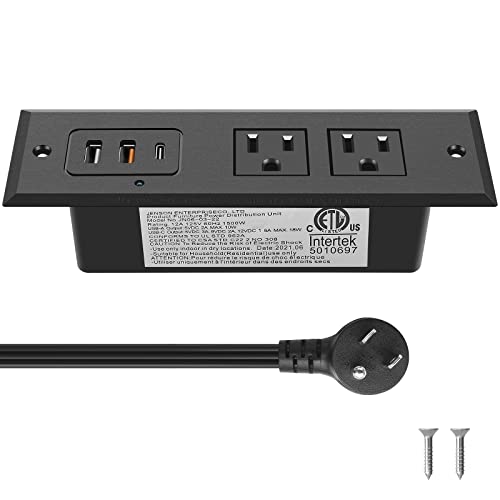
Best for: nightstands or end tables where furniture hides the unit. This recessed power strip includes a QC 3.0 USB-A port (5V/3A, 9V/2A, 12V/1.5A) and a PD 3.0 USB-C port (5V/3A, 9V/2.22A, 12V/1.66A). It also offers a standard USB port and two US outlets, with a 6ft, 45-degree flat plug. Caution: device total output may auto-adjust when multiple ports are active, so don’t expect maximum each-port performance simultaneously.
- Recessed design minimizes furniture intrusion
- 20W USB-C PD, 18W USB-A fast charging
Best for: users who want integrated power without visible cords and who mainly charge smartphones, tablets, and small peripherals at a single location.
USB Charger Upoy, 45W Multiport Dock

Best for: households with multiple devices and a need for a compact desktop hub. This Upoy station has 4 USB-A and 2 USB-C ports plus a total 45W output, with a 5 ft cord. It supports charging for iPhones, iPads, Kindles, and travel accessories. Caution: it emphasizes compactness; heavy laptops may require a dedicated charger or higher total output.
- 6-device simultaneous charging
- Portable and space-saving
Best for: small desks or nightstands where a central, tidy charging hub is preferred over many individual adapters.
Roruite USB C 10-Port Charging Station
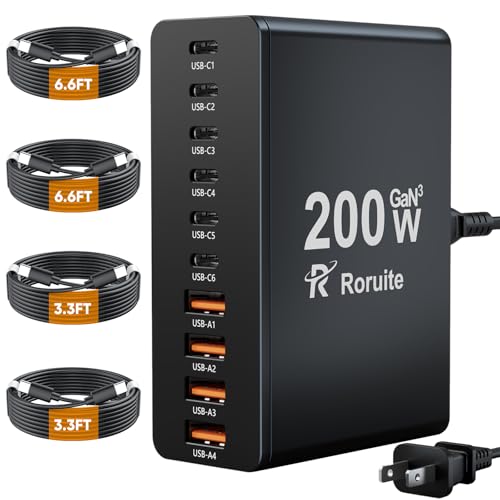
Best for: tech-heavy setups requiring high throughput. This 10-port block features six USB-C PD ports (20W max) and four USB-A ports (20W max) with a total output up to 200W. It supports charging for phones, tablets, and multiple laptops at once. Caution: power distribution can favor PD devices, potentially limiting non-PD ports when many devices draw power.
- 200W total output
- Universal compatibility with many devices
Choose this if you need one central hub for several high-demand devices across workstations or shared desks.
SAIPKYGS USB Charging Station (900W)

Best for: power users who need to charge many devices quickly in one location. This 12-in-1 charger features 8 USB-C ports and 4 USB-A ports, with smart charging to optimize output per device. Caution: due to the high port count, the unit is larger and may require a dedicated spot near outlets.
- Smart charging detects best output per device
- Compatible with laptops, tablets, and phones
Best for: home offices or shared workspaces where multiple devices from different families must be charged concurrently.
TenTrend Flat Plug Power Strip Tower

Best for: spaces where a slim, vertical design is essential. This tower offers 12 AC outlets and 8 USB ports, including 2 PD 20W USB-C ports, with a 10-foot extension cord. Caution: while plentiful, total power must not exceed the rated limit to avoid overload.
- Ultra-thin 0.27 inch plug design
- 45-degree right-angle plug to avoid bottom blockage
Choose this if you want a high-port-density solution that remains unobtrusive in a living room, dorm, or desk setup.
Buying Guide
What should you look for in a built-in USB charging station?
Power delivery and port mix matter. Look for USB-C PD ports for fast charging laptops and phones, and enough USB-A ports for older devices. Total power capacity should match your device load, especially in shared spaces.
Why consider recessed or furniture-integrated models?
Recessed or hidden units reduce visible clutter and prevent tip-over risk. They are ideal for nightstands and end tables where aesthetics matter as much as function.
Safety and compatibility considerations
Check surge protection, overcurrent, and overheat safeguards. Ensure compatibility with your devices, noting that some setups may prioritize PD ports over standard ports when power is limited.
Size, layout, and installation
Measure the furniture cutout or space where the unit will reside. Flat-plug designs save space against walls and furniture edges, while tower formats offer high port counts without desk clutter.
FAQ
- Q: Do built-in charging stations require professional installation?
- A: Most are designed for simple placement or tabletop use; recessed or furniture-integrated models may require basic routing, but many come with user-friendly installation options.
- Q: Can I charge a laptop and phone at the same time?
- A: Yes, if the station provides a USB-C PD port and adequate total wattage; check port counts and each port’s maximum output.
- Q: Are these stations safe for long-term use?
- A: Reputable models include surge protection and thermal safeguards; always follow manufacturer guidelines for safe operation.
- Q: Will ports share power, reducing charging speed?
- A: Some multi-port hubs dynamically distribute power; the performance may vary when several high-draw devices are connected simultaneously.