Best Power Modules for Desks: Clean, Safe, and Ready for Any Workspace
Power modules designed for desk surfaces help eliminate clutter, improve accessibility, and keep devices charged without sacrificing desk space. This guide surveys five desk-focused power modules, chosen for their versatility, safety certifications, and user-friendly installation. Each entry includes a concise feature snapshot to help you compare options at a glance.
| Product | Brand | Key Win | Mount Type | Ports |
|---|---|---|---|---|
| Jgstkcity Desk Clamp Power Strip | Jgstkcity | Desk-edge clamp, PD USB-C | Edge clamp | 2x PD USB-C, 2x USB-A, 3 outlets |
| Recessed Power Grommet With AC Outlets | Jgstkcity | Flush-mount grommet, PD USB-C | Grommet hole | 1x PD USB-C, outlets |
| Conference Recessed Power Strip Socket | Maggie | Tabletop power and USB charging | Recessed strip in table | 2 outlets, 2 USB |
| Recessed Power Strip USB-C PD 30W | Jgstkcity | Slim, space-saving, 30W PD-C | Recessed/flush-mount | 2 USB-C, 2 USB-A, 2 outlets |
| StarTech Power Outlet Module | StarTech.com | Office conference power hub | Table connectivity box compatible | 2 AC, 2 USB-A |
Jgstkcity Desk Clamp Power Strip

This desk-edge mounted power dock clamps securely to the back or side of a desk, offering a semi-permanent mount that helps reduce cable clutter. It combines a 40W total USB-C/USB-A charging station with two PD USB-C ports and two QC USB-A ports, making it suitable for charging laptops, tablets, and smartphones while you work. A compact, surface-mounted design keeps the surface clean, and the edge-mount bracket supports desks up to 1.96 inches thick. Note that total USB-C output is 40W, with each USB-C port capped at 20W.
Key features include: a secure desk-edge clamp, 2 PD 20W USB-C ports, 2 QC3.0 USB-A ports, and a 3-outlet power strip. The unit is ETL listed for safety and intended for home or office use. Installation is quick and creates a low-profile charging station right at your workstation.
Recessed Power Grommet With AC Outlets

This flush-mount grommet design removes bulky adapters and keeps a tidy desk surface while delivering a PD 20W USB-C charging port on the top. It fits a standard 3-1/8 inch grommet hole, making it a practical choice for clean, minimalist setups. The recessed form sits nearly flush with the desk, saving space and reducing cable visibility for a neater workspace.
Feature highlights include space-saving desk design, built-in PD USB-C port, and easy installation via a standard grommet hole. This option is ideal for workstations that prioritize a clean surface with ready USB-C charging capabilities for mobile devices and peripherals alike.
Conference Recessed Power Strip Socket
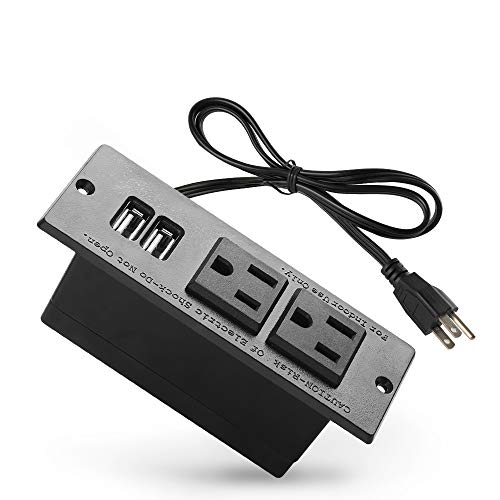
This model provides a recessed footprint with two outlets and two USB ports designed for conference tables. It ships with a 6.5-foot power cord and is installed by cutting a rectangular opening in the table, inserting the power strip, and securing it. The cutout size is specified, enabling a precise fit for boardrooms, training rooms, or shared spaces where tidy power access is essential.
Key considerations include the combination of AC and USB charging, table-mount compatibility, and the ability to keep meeting spaces free of tangled cords. The unit is well-suited for environments requiring reliable power delivery during lengthy sessions or collaborative work.
Recessed Power Strip 30W USB C
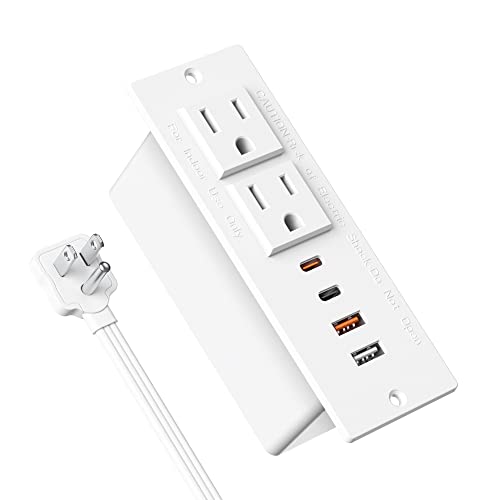
Designed as a minimalist surface-mount recessed outlet extender, this unit minimizes desk clutter while offering 30W total USB-C and USB-A output. The USB-C PD 3.0 port can deliver high-speed charging for devices like iPads and iPhones, while the USB-A port uses QC 3.0 for downstream devices. The installation is straightforward: cut a rectangle, insert, and secure the unit flush with the surface. The 4.28″ x 1.73″ x 2″ hole requirement makes it a good fit for compact desks or end tables.
Considerations include shared 30W output between USB-C and USB-A when all ports are in use, the flush-mount design, and the compact footprint that preserves surface area while providing essential charging and power delivery.
StarTech Power Outlet Module

This power outlet module adds power and charging capability to conference table connectivity boxes. It provides 2 AC power outlets and 2 USB-A ports, enabling easy access to power during meetings. The module is designed for integration with StarTech conference table systems, and installation can be performed as a standalone unit or as an accessory to compatible modular boxes. The USB charging capability helps keep participants’ devices powered through long sessions.
Important considerations include compatibility with existing conference table setups, the balance of AC and USB charging, and the option to mount via the supplied table bracket or integrate into compatible StarTech configurations for a clean, professional presentation environment.
Buying Guide: Choosing The Right Desk Power Module
- Mounting style: Edge clamps, recessed flush mounts, or grommet inserts each offer different aesthetics and space considerations. Edge clamps are quick to install and remove, while recessed and grommet options deliver a cleaner surface with fewer protrusions.
- Power and charging needs: Assess required total wattage and USB-C Power Delivery (PD) capabilities. If you frequently charge laptops or tablets, prioritize USB-C PD ports with higher wattage and ensure total port output aligns with your device usage to avoid bottlenecks.
- USB port types and sharing: Some units share total power among USB-C and USB-A ports. Plan for scenarios where multiple devices are charging simultaneously to avoid hitting the overall power limit.
- Safety and compliance: Look for ETL or UL certifications and flush-mount or weather-resistant designs if your environment requires added safety and durability (home, office, or conference rooms).
- Desk compatibility: Check maximum desk thickness for edge clamps or the hole size for grommets. Ensure clearance from walls or edges to avoid interference with drawers, cables, or peripherals.
- Ease of installation and maintenance: Consider whether you prefer a tool-free edge clamp or a more permanent recessed installation. Removable modules can be beneficial for reconfigurations or moving offices.
- Aesthetic integration: Match finishes (black, white, or gray) to your desk and office decor. A low-profile flush-mount design tends to look cleaner in modern setups.
- Safety features: Overload protection, surge protection, and proper cable management reduce the risk of overheating and electrical faults in busy workspaces.
In practice, the best choice depends on your workspace priorities—whether you favor a minimal surface look with recessed options, or a visible but easily reconfigurable edge-mounted design for frequent desk changes. For conference rooms or shared work areas, a robust recessed power strip or a modular system can support multiple devices without compromising table aesthetics.