Best RS485 to Ethernet Converters for Industrial Networking
For robust, long-distance industrial communication, RS485 to Ethernet converters are essential. They bridge legacy serial devices with modern IP networks, enabling remote monitoring, centralized control, and reliable data logging. This article highlights five top options and what to consider when selecting a converter, from protocol support to ease of configuration and ruggedness for harsh environments.
| Product | Brand | Key Benefit | Notable Feature |
|---|---|---|---|
| Waveshare RS485 to Ethernet Converter | Waveshare | High-speed, scalable, flexible protocols | Modbus-like features, configurable via multiple interfaces |
| PUSR TCP232-306 RS232 RS485 RS422 to Ethernet | PUSR | Low latency, multi-host polling | Optimized TCP/IP stack, reliable watchdog |
| PUSR DR302 DIN Rail Gateway | PUSR | DIN rail friendly for industrial setups | Supports TCP/UDP and Virtual COM |
| Coolwell RS485 to Ethernet Converter | Coolwell | Dual serial ports, independent operation | Industrial-grade ARM processor, MDI/MDIX auto |
| Waveshare Dual Port RS232/RS485 Converter | Waveshare | Dual serial ports with Websocket support | Industrial-grade features, Modbus friendly |
Waveshare RS485 to Ethernet Converter

The Waveshare RS485 to Ethernet Converter integrates a compact, high-performance M0 series 32-bit ARM processor with a 10/100M Auto-MDI/MDIX Ethernet interface. It supports a configurable RS485 baud rate from 600 bps to 230.4 kbps and offers five parity checks (None, Odd, Even, Mark, Space). Operational modes include TCP Server/Client, UDP Server/Client, and HTTPD Client (GET/POST). Configuration can be performed via a web page, AT commands, serial protocol, or network protocol. It also includes a configuration protocol for integration into custom software. This model supports customized heartbeat and registration packets for reliable sensor data collection, and a customizable webpage for device branding. RFC2217-like protocol allows compatibility with devices whose settings may change.
PUSR TCP232-306 RS232 RS485 RS422 to Ethernet

The PUSR TCP232-306 device targets reliable serial-to-Ethernet conversion with a Cortex-M0 core and a tightly optimized TCP/IP stack. It enables Modbus RTU to Modbus TCP conversion and supports multi-host polling, making it suitable for scenarios with multiple serial devices requiring centralized access. Built-in watchdog features provide automatic restarts if the device encounters issues, ensuring higher uptime in industrial environments.
PUSR DR302 DIN Rail Modbus Gateway

The PUSR DR302 is designed for DIN rail installations, combining ease of use with Modbus gateway capabilities. It supports Modbus RTU to Modbus TCP, enabling seamless data exchange across serial and Ethernet networks. The device supports TCP server and client modes, UDP server and client modes, and Virtual COM, making it adaptable to a variety of industrial data collection schemes and remote monitoring setups.
Coolwell RS485 to Ethernet Converter

Coolwell’s RS485 to Ethernet Converter is built for industrial reliability, featuring an M4 series 32-bit ARM processor and speeds up to 120 MHz. It provides a 10/100M Auto-MDI/MDIX Ethernet interface and supports independent operation of RS232 and RS485 ports, minimizing cross-port interference. Its rugged design makes it suitable for harsh environments where stable serial-to-Ethernet bridging is required.
Waveshare Dual Port RS232/RS485 to Ethernet
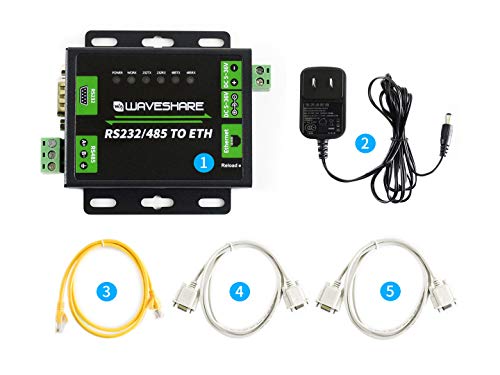
This Waveshare model provides dual serial ports (RS232 and RS485) with a high-speed ARM processor and a 10/100M Auto-MDI/MDIX Ethernet interface. It supports multiple working modes including TCP/UDP servers and clients, and HTTPD client for GET/POST. The device is configurable via a webpage, AT commands, and serial/network protocols, with Websocket support for bi-directional transparent data transmission between RS232/RS485 and Ethernet networks. Heartbeat packets and registration packets help maintain reliable connections across devices.
Buying Guide: Key Purchase Considerations
Choosing the right RS485 to Ethernet converter depends on your application requirements. Consider the following factors to ensure a good fit for your network, devices, and environment.
- Interface compatibility: Confirm whether you need RS485 only or additional ports (RS232/RS422). Some models offer dual ports and independent operation to prevent interference.
- Network protocol support: Evaluate whether TCP, UDP, or HTTP/D (HTTPD) client modes are necessary. Some devices offer RFC2217-like protocols for serial settings over network.
- Data rates and baud options: Look for configurable baud rates (e.g., 600 bps to 230.4 kbps) to match your serial devices’ performance requirements.
- Power, space, and mounting: Consider DIN rail compatibility for industrial panels and the available power supply range. Compact designs are easier to deploy in constrained spaces.
- Reliability features: Built-in watchdogs, auto-restart, and heartbeat/registration packets help maintain uptime in remote or harsh environments.
- Web-based and command-line configuration: A convenient configuration interface reduces deployment time. Ensure security options (user access, authentication) align with your network policies.
- Modbus and industrial protocol support: If you need Modbus bridging, verify explicit Modbus RTU/TCP compatibility or gateway features across devices.
- Scalability and multi-device polling: For large installations, support for multi-host polling and scalable networking helps maintain performance as devices grow.
Practical deployment tips:
- Map each serial device to a unique IP endpoint and document its settings to simplify monitoring.
- Utilize heartbeat and registration packets to detect link failures early and trigger alerts.
- Test with realistic traffic patterns (polling intervals, payload size) to validate latency and reliability under load.
- Where possible, enable secure management interfaces and update firmware to mitigate vulnerabilities.