Best Pop Up Power Grommets for Desks, Countertops, and Conference Tables
Pop up power grommets offer a clean, space-saving way to access electricity and USB charging right at your workspace. Designed to recess into desks, countertops, or conference tables, these outlets stay hidden until you need them. This guide highlights five top options that balance safety, charging speed, and ease of installation for American homes and offices.
Summary of featured products:
| Product | Key Features | Hole Size | Ports | Power |
|---|---|---|---|---|
| Jgstkcity Pop Up Outlet for Countertops | 20W USB-C, 4 USB, tamper-resistant | 2.5 in | 4 AC, 2 USB-C, 2 USB-A | 1875W |
| ANNQUAN 2 Inch Space Saver Pop Up Outlet | 2 outlets, splashproof, ETL listed | 2 in | 2 AC, USB-C/USB-A | — |
| Jgstkcity 65W USB-C Hidden Desktop Power Grommet | 3-inch hole, 8 USB ports | 3 in | 1 AC, 8 USB ports | — |
| 2 Inch Pop Up Outlet for Countertop | 5 devices, 12A, 6 ft cord | 2 in | 2 AC, 3 USB (2-C, 1-A) | — |
| Jgstkcity Pop Up Outlet with Wireless Charger | 15W wireless charging, splash resistant | 3 in | 4 AC, wireless pad | — |
Jgstkcity Pop Up Outlet for Countertops

The Jgstkcity model fits a 2.5-inch hole and uses a built-in pop-up mechanism. It installs by drilling the hole, sliding the body in, and tightening a mounting ring. It’s designed for kitchens, offices, and conference rooms where a clean, recessed look is desired. The unit provides four AC outlets along with two USB-C ports and two USB-A ports, enabling simultaneous charging for multiple devices. A tamper-resistant design helps meet safety codes in households with children.
ANNQUAN 2-Inch Space Saver Pop Up Outlet
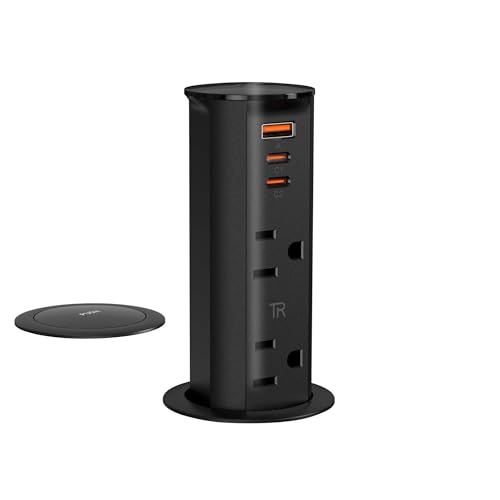
ANNQUAN offers a compact 2-inch pop up socket with splash resistance and ETL listing. It retracts completely when not in use, preserving surface aesthetics. The unit provides two outlets and USB-C/USB-A charging options, which are suitable for modest desk setups in home offices and kitchens. The design supports clean island and counter layouts, and it’s noted for space-saving installation and practical cable management. Be sure to verify bottom dimensions to ensure a flush sink into your workspace.
Jgstkcity 65W USB-C Hidden Desktop Power Grommet

This 3-inch grommet targets desks and conference tables, maximizing desktop space with a slim profile. Its surface-mount installation keeps the device flush with most surfaces, providing a nearly seamless look. The 3-inch aperture is a standard choice for many furniture pieces, and the kit is designed to drill quickly for straightforward installation. The product is suited for setups requiring a robust power hub with multiple USB ports and reliable retraction.
2 Inch Pop Up Outlet for Countertop

This compact 2-inch pop up outlet emphasizes easy installation and a 6-foot extension cord. It accommodates up to five devices with a combination of two AC outlets and three USB ports (2 USB-C, 1 USB-A). The feature set includes a TR-rated receptacle to improve occupant safety and a compact, clutter-free profile suitable for home offices and workstations that need a quick power upgrade without a large footprint.
Jgstkcity Pop Up Outlet with 15W Wireless Charger

This 3-inch desk hole grommet adds a wireless charger on top, alongside four AC outlets at 15A. It’s designed for splash resistance, which helps in kitchen counters or busy conference tables. A spring-loaded mechanism makes deployment smooth, and the 6-foot extension cord aids flexible placement. It is an ideal choice for users prioritizing wireless charging in addition to reliable cable-powered access.
Pop Up Outlet for Countertop With 15W Wireless Charger

This 2.5-inch pop up unit offers a full set of four outlets plus two USB-C ports and a USB-A port, all supported by a 15A, 1875W rating. The design includes a 6-foot 16 AWG extension cord and a built-in 15W wireless charger. It blends into countertops while delivering high-capacity charging for multiple devices, making it suitable for kitchens and shared workspaces.
Buying Guide
Key purchase considerations help buyers compare options across brands and models:
- Hole size and mounting: Confirm the required hole diameter (2, 2.5, or 3 inches) and the installation method (flush mount vs. surface mount). A correct fit ensures a stable, flush appearance and reduces debris gaps.
- Power and outlets: Count the number of AC outlets and USB ports. USB-C ports with PD support (up to 65W or more) are ideal for fast device charging, while USB-A remains common for older devices.
- Safety and codes: Look for tamper-resistant (TR) receptacles and ETL or UL listings to meet electrical codes and safety standards, particularly in homes with children or busy office environments.
- Water and splash resistance: Splashproof or splash-resistant designs are beneficial for kitchens and wet areas; verify IP ratings if available.
- Wireless charging: If wireless charging is important, ensure the mat delivers reliable Qi charging with compatible devices and check heat generation during use.
- Recession depth: The required depth of the grommet affects how much surface area is preserved. Deeper units may offer more protection but require a thicker desk or counter.
- Cable management: Consider the length of the attached extension cord and the availability of cable management features to keep work surfaces tidy.
- Material and finish: Match the countertop or desk finish (black, white, or metallic) to maintain a cohesive look in your space.
- Warranty and support: Check manufacturer warranties and customer service responsiveness, especially for high-use environments like offices and conference rooms.
Comparisons for Different Setups
- Small home office: A compact 2-inch unit with multiple USB-C ports and TR outlets keeps the desk surface clean without crowding the hole.
- Kitchen island: A 3-inch or larger unit with splash resistance and wireless charging becomes a practical hub for devices and appliances.
- Conference table: A larger 3-inch model with a robust extension cord and 4–8 USB ports supports numerous devices during meetings.
- Standing desk: A recessed, low-profile grommet with high amperage and fast USB-C charging minimizes reach-time to outlets.
Choosing the right pop up power grommet depends on hole size, surface type, and how many devices you need to charge at once. The highlighted options balance practicality with modern charging features, offering reliable power access without sacrificing surface aesthetics.